# Vim Connect App SDK (/docs)
The **Vim Connect App SDK** lets you build applications that run inside Electronic Health Record (EHR) systems. Your app appears as a sidebar within the provider's EHR, with real-time access to patient data, encounters, referrals, and orders.
## How It Works [#how-it-works]
Vim Connect uses a Chrome extension that injects the **Vim Hub** — an application hub overlay — into web-based EHR systems. Your application loads inside this hub and communicates with the extension through the SDK.
```
EHR (browser tab)
├── Vim Connect Extension
│ ├── Detects EHR context (patient, encounter, etc.)
│ ├── Extracts data from the page
│ └── Injects the Vim Hub sidebar
│ └── Your Application
│ └── @vimconnect/app-sdk
│ ├── Workflow Events (chart opened, encounter started)
│ ├── Context (real-time entity data)
│ ├── Entity API (read patient, encounter, order data)
│ ├── Writeback (update EHR fields)
│ └── Hub Controls (badges, notifications, status)
```
## What You Can Build [#what-you-can-build]
* **Clinical decision support** — Surface care gaps, drug interactions, or quality measures when a patient chart opens
* **Documentation assistants** — Pre-fill encounter notes, assessment fields, or referral details
* **Prior authorization** — Automate auth workflows when orders or referrals are created
* **Care coordination** — Display care team info, schedule follow-ups, or track referrals
* **Population health** — Show risk scores, wellness reminders, or preventive care alerts
## SDK Capabilities [#sdk-capabilities]
| Capability | Description |
| -------------------- | ------------------------------------------------------------------------------------------------------------- |
| **Workflow Events** | Get notified when the provider opens a chart, starts an encounter, creates a referral, or places an order |
| **Context Tracking** | Subscribe to real-time entity data changes as the provider navigates the EHR |
| **Entity API** | Read patient demographics, problems, medications, insurance, encounter details, and more |
| **Writeback** | Update encounter notes, diagnoses, orders, and referrals — with permission controls for disruptive operations |
| **Hub Controls** | Set your app icon status, show notification badges, display push notifications, and control visibility |
| **Type Safety** | Full TypeScript types and Zod schemas for all entities, events, and API methods |
## Quick Example [#quick-example]
```typescript
import { initVimSDK } from '@vimconnect/app-sdk';
import type { Patient } from '@vimconnect/app-sdk';
// Initialize the SDK (runs inside the Vim Hub sidebar)
const sdk = await initVimSDK();
// Tell the hub your app is ready
sdk.hub.setActivationStatus('ENABLED');
// React to workflow events
sdk.ehr.workflow.on('chart_open', (event) => {
const patient = event.entities.patient; // fully typed
console.log('Chart opened for patient:', patient.id);
});
// Track real-time context changes
sdk.ehr.context.onChange('encounter_open:encounter', (prev, curr) => {
if (curr) {
console.log('Active encounter:', curr.fields.cc);
}
});
// Read additional data of the current patient context
const result = await sdk.ehr.api.patient.getPatient();
// Write back to the EHR (with permission handling)
const cap = sdk.ehr.context.encounter.getCapability('update');
if (cap.available && sdk.ehr.context.encounter.hasPermission('update')) {
await sdk.ehr.context.encounter.update({
assessment: { findings: 'Normal exam' },
});
}
```
## Start Here [#start-here]
Two shortcuts that save the most time on day one:
* **[Start from the Demo App](/docs/getting-started/demo-app)** — fork a working Vim app with the
OAuth flow already wired and an explorer that drives every capability your manifest declares
against live EHR context.
* **[Build with an AI Agent](/docs/getting-started/ai-tooling)** — `@vimconnect/app-sdk` ships a
Claude Code skill, `vim-app-sdk-docs`, that makes your agent look up real entity fields, event
ids, and method signatures instead of inventing them. One `cp` to install.
## Next Steps [#next-steps]
* [Quick Start](/docs/getting-started/quick-start) — Build your first Vim app in 5 minutes
* [Authentication](/docs/authentication) — Implement OAuth 2.0 for your application
* [EHR Connectivity](/docs/ehr-connectivity) — Work with events, context, and APIs
* [Vim Hub](/docs/vim-hub) — Control your app's presence in the hub
* [API Reference](/docs/api-reference) — Full type reference for entities, events, and methods
---
# Context Keys Reference (/docs/api-reference/context-keys)
Context keys identify which entity data to track within a specific workflow event. Use them with `sdk.ehr.context.onChange()` to receive real-time updates.
## Usage [#usage]
```typescript
// Format: 'eventType:entityType'
sdk.ehr.context.onChange('chart_open:patient', (prev, curr) => {
if (!prev && curr) console.log('Patient opened');
if (prev && !curr) console.log('Patient closed');
if (prev && curr) console.log('Patient data updated');
});
```
For detailed usage patterns, see [Context guide](/docs/ehr-connectivity/context).
## Available Keys [#available-keys]
This section renders live from the generated API reference. Machine-readable source: `/collection/api-reference.json`.
---
# Entity API Reference (/docs/api-reference/entity-api)
The Entity API provides typed methods for reading and writing entity data. All methods are available on `sdk.ehr.api` organized by entity namespace.
## Usage [#usage]
The Entity API is always scoped to the entity the provider currently has open in the EHR — the patient, encounter, referral, or order in context. You call each method with no id; it reads (or updates) the entity in context. Use these methods to pull the fuller record — data that is not on the EHR screen, because the page only renders what the EHR loaded into the current view.
```typescript
// Read the fuller record for the patient in context — no id needed
const patient = await sdk.ehr.api.patient.getPatient();
const problems = await sdk.ehr.api.patient.getProblems();
const insurance = await sdk.ehr.api.patient.getInsurances();
// Update the encounter in context — pass only the data to write
await sdk.ehr.api.encounter.updateBillingCodes(
{ billingInformation: { procedureCodes: [{ code: '99213', description: 'Office visit' }] } },
);
```
An older form that took an explicit id (`getPatient({ patientId })`, `updateBillingCodes({ encounterId }, data)`) is deprecated — the id now comes from the active context, so omit it.
List and search methods return one page at a time and take an optional `input` (`{ cursor?, query?, filters? }`) — see [Paginated Methods](/docs/ehr-connectivity/entity-api#paginated-methods). The table below marks which methods are paginated.
For writeback with permission handling, see [Writeback guide](/docs/ehr-connectivity/writeback).
## Available Methods [#available-methods]
This section renders live from the generated API reference. Machine-readable source: `/collection/api-reference.json`.
---
# Entity Types (/docs/api-reference/entity-types)
Entity types represent the core healthcare data structures available through the SDK. Each entity has a TypeScript type and a Zod schema for runtime validation.
## Usage [#usage]
```typescript
import type { Patient, Encounter, Order, Referral } from '@vimconnect/app-sdk';
// Zod schemas for runtime validation
import {
PatientSchema,
EncounterSchema,
OrderSchema,
ReferralSchema,
} from '@vimconnect/app-sdk';
// Validate data at runtime
const result = PatientSchema.safeParse(data);
if (result.success) {
const patient: Patient = result.data;
}
```
## Accessing Entity Data [#accessing-entity-data]
Entities are available through workflow events and context subscriptions:
```typescript
// Via workflow events (entity references — IDs only)
sdk.ehr.workflow.on('chart_open', (event) => {
const patientRef = event.entities.patient;
console.log('Patient ID:', patientRef.id);
});
// Via context subscriptions (full entity data)
sdk.ehr.context.onChange('chart_open:patient', (prev, curr) => {
if (curr) {
console.log('Patient:', curr.fields.demographics?.firstName);
}
});
// Via Entity API — get extended data for the patient in the current context
const result = await sdk.ehr.api.patient.getPatient();
```
## Type Definitions [#type-definitions]
This section renders live from the generated API reference. Machine-readable source: `/collection/api-reference.json`.
---
# API Reference Overview (/docs/api-reference)
The API reference is auto-generated from the SDK's Default Collection type definitions.
## Sections [#sections]
* [Entity Types](/docs/api-reference/entity-types) — Patient, Encounter, Order, Referral with all fields
* [Shared Types](/docs/api-reference/shared-types) — Demographics, Address, ContactInfo, Provider, and more
* [Workflow Events](/docs/api-reference/workflow-events) — chart\_open, encounter\_open, referral\_start, referral\_save
* [Context Keys](/docs/api-reference/context-keys) — All context subscription keys
* [Entity API](/docs/api-reference/entity-api) — SDK method signatures
---
# Shared Types (/docs/api-reference/shared-types)
Shared types are reusable data structures referenced across multiple entity types. For example, `Provider` appears in Patient (as `pcp`), Encounter, Order, and Referral.
## Usage [#usage]
This section renders live from the generated API reference. Machine-readable source: `/collection/api-reference.json`.
## Type Definitions [#type-definitions]
This section renders live from the generated API reference. Machine-readable source: `/collection/api-reference.json`.
---
# Workflow Events Reference (/docs/api-reference/workflow-events)
Workflow events fire once when the provider triggers an action in the EHR. Each event carries typed entity references.
## Subscribing [#subscribing]
```typescript
import type { EventType } from '@vimconnect/app-sdk';
// Single event
sdk.ehr.workflow.on('chart_open', (event) => {
// A reference — { type: 'existing', id, entityType } — not the patient record.
console.log('Patient reference:', event.entities.patient);
});
// Multiple events
sdk.ehr.workflow.on(['chart_open', 'encounter_open'], (event) => {
console.log(event.type, event.entities);
});
```
For detailed usage patterns, see [Workflow Events guide](/docs/ehr-connectivity/workflow-events).
## Available Events [#available-events]
Expand **Example payload** on any row to see the object your handler receives. `entities` holds
references, not records: read the data with the [entity API](/docs/ehr-connectivity/entity-api).
`componentId` and `systemId` vary by EHR.
This section renders live from the generated API reference. Machine-readable source: `/collection/api-reference.json`.
---
# Changelog (/docs/changelog)
## How to read this changelog [#how-to-read-this-changelog]
The SDK is published to npm as [`@vimconnect/app-sdk`](https://www.npmjs.com/package/@vimconnect/app-sdk).
Every release you see below changed the SDK's **public type surface** — the entity types, workflow
events, error codes, exports and initialization options your app compiles against.
Releases that changed only internals are deliberately not listed. Most releases are of that kind, so
listing them all would bury the ones that can actually affect your code.
Each release carries a label saying how it can affect your code, and sometimes a second saying what it changed about EHR coverage:
| Label | What it means for you |
| ------------------------------------------------------------------ | -------------------------------------------------------------------------------------------------------------------------------------------------------------------------------------------------------------------------------- |
| New feature | Names were added. Existing code keeps compiling; adopt the new names when you need them. |
| Breaking change | A name was removed or renamed. On an SDK release your code stops compiling; on a collection release it keeps compiling and the field reads `undefined`, which is the more dangerous of the two. The entry names the replacement. |
| New EHR system | A whole EHR configuration is now supported. |
| New EHR fields | Additional fields on an EHR already supported. |
An entry headed **Collection vNN** is a **collection** release — a change to what the platform
scrapes, maps and automates inside a live EHR. Those reach your app through the platform rather
than through npm, so there is nothing to install and usually no TypeScript to diff: a new field on
an existing entity, a wider enum or a whole new EHR adapter leaves the exported names untouched.
The two EHR labels appear only on these, and a collection release can carry **Breaking change**
alongside one of them — a release that both removes a field and adds coverage is both things at
once. They are listed here beside the SDK releases, in date order, because a developer chasing a
behaviour change does not know in advance which side it came from. Check the
[EHR Support Matrix](/docs/ehr-support) for current coverage.
> **Note**
>
> Pin a version in `package.json` if you want to upgrade deliberately. The SDK loads its runtime from
> Vim's CDN, so bug fixes reach your app without a version bump — only the type surface tracked here
> is tied to the version you install.
{/* GENERATED:START — do not edit below; run `pnpm changelog` */}
Every line links to the reference page that documents that part of the SDK: [entity types](/docs/api-reference/entity-types), [workflow events](/docs/api-reference/workflow-events), [error codes](/docs/error-handling), [exports](/docs/api-reference) and [init options](/docs/getting-started/initialization).
## Collection v37 — 2026-09-10 [#collection-v37--2026-09-10]
Breaking change
New EHR fields
`order.orderingProvider` is now `order.orderingProviderId` — the id alone, rather than the embedded provider. If you read the old field you get `undefined`; resolve the id through `provider.getById()`. The release also adds a `user` entity, which is not usable yet and should not be built against.
* [Entity types](/docs/api-reference/entity-types) — `user`
* [API operations](/docs/ehr-connectivity/entity-api) — `user.getSessionUser`
* [Fields](/docs/api-reference/entity-types) — `order.orderingProviderId`
* [Removed fields](/docs/api-reference/entity-types) — `order.orderingProvider`
## Collection v34 — 2026-09-03 [#collection-v34--2026-09-03]
New EHR fields
Medications carry `status`, `endDate` and `recordedDate`, so you can tell an active prescription from a discontinued one instead of treating every row on the list as current.
* [Fields](/docs/api-reference/entity-types) — `medication.endDate`, `medication.recordedDate`, `medication.status`
## Collection v33 — 2026-08-21 [#collection-v33--2026-08-21]
Breaking change
New EHR fields
Vitals are readable through `patient.getVitals()`, with a LOINC code and a UCUM unit, so a blood pressure arrives labelled rather than as a bare number. The shape changed to get there: `vital.name`, `unit`, `loinc`, `value` and `measurementDate` moved under `basicInformation` and `values`, so the flat fields read `undefined`.
* [API operations](/docs/ehr-connectivity/entity-api) — `patient.getVitals`
* [Fields](/docs/api-reference/entity-types) — `patient.vitals`, `vital.basicInformation`, `vital.basicInformation.loinc`, `vital.basicInformation.name`, `vital.basicInformation.unit`, `vital.values`
* [Removed fields](/docs/api-reference/entity-types) — `vital.loinc`, `vital.measurementDate`, `vital.name`, `vital.unit`, `vital.value`
## Collection v32 — 2026-08-21 [#collection-v32--2026-08-21]
New EHR fields
`patient.getMedications()` returns the medication list, with `onSetDate` for when each was started. Before this the only medications you could see were the ones on an order.
* [API operations](/docs/ehr-connectivity/entity-api) — `patient.getMedications`
* [Fields](/docs/api-reference/entity-types) — `medication.onSetDate`, `patient.medications`
## v0.4.55 — 2026-08-14 [#v0455--2026-08-14]
New feature
Adds a provider entity you can read directly — name, specialty, NPI and facility — instead of picking provider fields out of the encounter or referral that referenced them.
* [Entity types](/docs/api-reference/entity-types) — added `ProviderFacilitty`, `ProviderRecord`, `Quantity`
* [Exports](/docs/api-reference) — added `ProviderApi`, `ProviderFacilitty`, `ProviderFacilittySchema`, `ProviderRecord`, `ProviderRecordSchema`, `Quantity`, `QuantitySchema`
## Collection v31 — 2026-08-14 [#collection-v31--2026-08-14]
Breaking change
New EHR fields
The provider entity is now `providerRecord`. The old id collided with the `Provider` shared type and broke type generation; if you referenced `provider` as an entity type, rename it. The `Provider` type on encounters and referrals is unchanged.
* [Entity types](/docs/api-reference/entity-types) — `providerRecord`
* [Removed entity types](/docs/api-reference/entity-types) — `provider`
* [Removed fields](/docs/api-reference/entity-types) — `provider.demographics`, `provider.facility`, `provider.identifiers`, `provider.identifiers.ehrProviderId`, `provider.identifiers.npi`
## Collection v30 — 2026-08-14 [#collection-v30--2026-08-14]
New EHR fields
Providers become a thing you can fetch: `provider.getById()` returns demographics, NPI and facility, so an app can show who a referral is going to without waiting for that provider to appear in context.
* [Entity types](/docs/api-reference/entity-types) — `provider`
* [Shared types](/docs/api-reference/shared-types) — `provider-facilitty`
* [API operations](/docs/ehr-connectivity/entity-api) — `provider.getById`
* [Fields](/docs/api-reference/entity-types) — `provider.demographics`, `provider.facility`, `provider.identifiers`, `provider.identifiers.ehrProviderId`, `provider.identifiers.npi`
## Collection v29 — 2026-08-13 [#collection-v29--2026-08-13]
New EHR fields
Medication quantity is a typed `Quantity` — a value and a unit — rather than a loose shape, so "30 tablets" survives the round trip with its unit attached.
* [Shared types](/docs/api-reference/shared-types) — `quantity`
## Collection v27 — 2026-08-10 [#collection-v27--2026-08-10]
Breaking change
New EHR fields
`order.medication` is a single object, not an array. An order carries one medication, and the array implied otherwise. Code doing `order.medication[0]` reads `undefined` rather than failing, so this is worth checking for even if nothing broke visibly.
* [Fields](/docs/api-reference/entity-types) — `order.medication`
* [Removed fields](/docs/api-reference/entity-types) — `order.medications`
## v0.4.50 — 2026-07-27 [#v0450--2026-07-27]
New feature
Orders become observable: `order_select` and `order_sign` tell your app when the provider picks an order and when they sign it, and `LabResult` gives lab data a type of its own. If your app reacts to ordering, this is the release that lets it.
* [Entity types](/docs/api-reference/entity-types) — added `LabResult`, `OrderSelectEvent`, `OrderSignEvent`
* [Workflow events](/docs/api-reference/workflow-events) — added `order_select`, `order_sign`
* [Exports](/docs/api-reference) — added `LabResult`, `LabResultSchema`, `OrderApi`, `OrderSelectEvent`, `OrderSelectEventSchema`, `OrderSignEvent`, `OrderSignEventSchema`
## Collection v20 — 2026-07-27 [#collection-v20--2026-07-27]
Breaking change
New EHR fields
The largest data release so far: allergies and lab results become readable and typed, orders become observable through `order_select` and `order_sign`, and encounters expose their procedure codes. Allergy was restructured to do it — `allergen`, `allergenType`, `reaction` and `severity` moved into `allergyDetails` and `allergyReactionDetails` — and `order.diagnoses` became `order.assessments`. This is the collection half of SDK v0.4.50.
* [Shared types](/docs/api-reference/shared-types) — `labResult`
* [Workflow events](/docs/api-reference/workflow-events) — `order_select`, `order_sign`
* [API operations](/docs/ehr-connectivity/entity-api) — `encounter.getProcedureCodes`, `order.getOrderById`, `patient.getAllergies`, `patient.getLabResults`
* [Fields](/docs/api-reference/entity-types) — `allergy.allergyDetails`, `allergy.allergyDetails.criticality`, `allergy.allergyDetails.name`, `allergy.allergyReactionDetails`, `allergy.allergyReactionDetails.name`, `allergy.allergyReactionDetails.severity`, and 16 more
* [Removed fields](/docs/api-reference/entity-types) — `allergy.allergen`, `allergy.allergenType`, `allergy.reaction`, `allergy.severity`, `order.createdDate`, `order.diagnoses`, and 7 more
## v0.4.49 — 2026-07-26 [#v0449--2026-07-26]
New feature
Two timeouts you can tune — `handshakeTimeout` and `requestTimeout` — for apps on slower EHR hosts where the defaults were too tight. `EXTENSION_UPDATE_REQUIRED` lets you tell a provider their extension is too old rather than failing with a generic connection error.
* [Error codes](/docs/error-handling) — added `EXTENSION_UPDATE_REQUIRED`
* [Exports](/docs/api-reference) — added `PaginatedResponse`, `Pagination`
* [Init options](/docs/getting-started/initialization) — added `handshakeTimeout`, `requestTimeout`
## Collection v15 — 2026-07-09 [#collection-v15--2026-07-09]
New EHR system
eClinicalWorks (web) joins the supported EHRs. Nothing changes in your code — an app already built against the entity API now runs for ecw-web practices.
* [EHR systems](/docs/ehr-support) — `ecw_web`
## v0.4.46 — 2026-06-29 [#v0446--2026-06-29]
New feature
Four workflow events gain their own types, so a handler for `chart_open`, `encounter_open`, `referral_start` or `referral_save` gets the event's shape from the compiler instead of a cast.
* [Entity types](/docs/api-reference/entity-types) — added `ChartOpenEvent`, `EncounterOpenEvent`, `ReferralSaveEvent`, `ReferralStartEvent`
* [Exports](/docs/api-reference) — added `ApiResponse`, `ChartOpenEvent`, `ChartOpenEventSchema`, `EncounterOpenEvent`, `EncounterOpenEventSchema`, `ReferralSaveEvent`, `ReferralSaveEventSchema`, `ReferralStartEvent`, `ReferralStartEventSchema`, `TypedContextData`
## Collection v8 — 2026-06-16 [#collection-v8--2026-06-16]
Breaking change
New EHR fields
Encounters carry billing: read `encounter.billingInformation.procedureCodes` and write them back with `encounter.updateProcedureCodes()`, which is what a coding or charge-capture app needs. This replaces `encounter.billingCodes` and `encounter.updateBillingCodes()`, and the `cpt_code` type is now `procedure` — the old names are gone, not deprecated.
* [Shared types](/docs/api-reference/shared-types) — `procedure`
* [API operations](/docs/ehr-connectivity/entity-api) — `encounter.updateProcedureCodes`
* [Fields](/docs/api-reference/entity-types) — `encounter.billingInformation`, `encounter.billingInformation.procedureCodes`
* [Removed shared types](/docs/api-reference/shared-types) — `cpt_code`
* [Removed API operations](/docs/ehr-connectivity/entity-api) — `encounter.updateBillingCodes`
* [Removed fields](/docs/api-reference/entity-types) — `encounter.billingCodes`
## v0.4.43 — 2026-06-14 [#v0443--2026-06-14]
Breaking change
`CptCode` becomes `Procedure`, and the `system` field goes with it — a procedure code now arrives without saying which code set it belongs to, so code that branched on `system` has nothing to branch on. The `idToken` init option lands in the same release, letting an app that runs its own token exchange still use `getIdToken()`.
* [Entity types](/docs/api-reference/entity-types) — added `Procedure`; **removed** `CptCode`
* [Error codes](/docs/error-handling) — added `ID_TOKEN_UNAVAILABLE`
* [Exports](/docs/api-reference) — added `Procedure`, `ProcedureSchema`; **removed** `CptCode`, `CptCodeSchema`
* [Init options](/docs/getting-started/initialization) — added `idToken`
## v0.4.38 — 2026-05-17 [#v0438--2026-05-17]
New feature
The error surface becomes specific: 25 codes replace guessing from messages, so an app can tell a missing extension from a timeout from a permission refusal and respond to each differently.
* [Error codes](/docs/error-handling) — added `BRIDGE_INIT_ERROR`, `CONNECTION_TIMEOUT`, `ENTITY_NOT_IN_CONTEXT`, `EXTENSION_NOT_FOUND`, `HANDSHAKE_TIMEOUT`, `INIT_ERROR`, `INVALID_DATA`, `INVALID_FIELDS`, `INVALID_OPERATION`, `INVALID_TOKEN_ENDPOINT`, `MANIFEST_NOT_AVAILABLE`, `MISSING_ACCESS_TOKEN`, `MISSING_REQUIRED_PARAMETER`, `MISSING_TOKEN_CODE`, `NOT_CONNECTED`, `NOT_EXISTS`, `NOT_IMPLEMENTED`, `OPERATION_NOT_CONFIGURED`, `PERMISSION_REQUIRED`, `TIMEOUT`, `TOKEN_FETCH_ERROR`, `TOKEN_REQUIRED`, `TOKEN_VALIDATION_FAILED`, `VALIDATION_ERROR`, `WRONG_CONTEXT`
## v0.4.16 — 2026-05-03 [#v0416--2026-05-03]
New feature
Worker Apps arrive — a headless runtime that receives EHR events without the provider opening your app — along with the namespace types the UI and worker SDKs are built from.
* [Exports](/docs/api-reference) — added `ApiNamespace`, `EhrContextHandleNamespace`, `HookDeclaration`, `HubNamespace`, `InvalidationReason`, `SuggestWritebackOptions`, `UIAppSDK`, `UIContextHandle`, `UIWorkflowHandle`, `WorkerContextCallback`, `WorkerContextHandle`, `WorkerHubState`, `WorkerSDK`, `WorkerWorkflowCallback`, `WorkerWorkflowHandle`, `getWorkerVimSDK`, `initWorkerVimSDK`
*Read 36 of the 36 SDK versions published up to `0.4.58` (2026-09-08); 7 changed the public type surface. Walked the production collection to v37 (2026-09-10); 11 releases changed something an app can observe.*
{/* GENERATED:END */}
## v0.4.0 — Initial public release [#v040--initial-public-release]
The baseline feature set, before the version-by-version history above.
* SDK initialization (`initVimSDK`, `getVimSDK`)
* Workflow event subscriptions
* Context change tracking
* Entity API (patient, encounter, referral, order)
* Context writeback with permission flow
* Hub controls (activation status, badges, push notifications)
* Worker App support (`initWorkerVimSDK`, `workerState`, `suggestWriteback`)
* Full TypeScript types and Zod schemas for all entity types
* `zod` v4+ as peer dependency
---
# Authentication (/docs/authentication)
Vim Connect uses the **OAuth 2.0 Authorization Code** flow to authenticate applications. Your app is not opened by a click — once the provider is logged into Vim and on the EHR, Vim launches your app automatically: the Worker app (if you build one) starts immediately, and the UI app's iframe loads when the provider opens the sidepanel. From there the app runs the OAuth flow and initializes the SDK with an access token.
## Flow Overview [#flow-overview]
```
1. Provider is logged into Vim and on the EHR — Vim launches your app automatically
(Worker app runs immediately; UI app iframe loads when the sidepanel is open)
│
▼
2. Vim opens your Launch URL
GET /launch?launch_id=abc123
│
▼
3. Your app redirects to Vim authorization
GET /app-auth/authorize?
response_type=code&
client_id=YOUR_ID&
launch=abc123&
scope=launch openid&
redirect_uri=https://your-app.com/app&
state=abc123:csrf_token
│
▼
4. Vim redirects back with authorization code
GET /app?code=AUTH_CODE&state=abc123:csrf_token
│
▼
5. Your server exchanges code for token ◄── with a token endpoint, this exchange runs through
POST /app-auth/token your hosted endpoint — you don't do it in your app (see Option 2)
{ grant_type, code, client_id, client_secret }
│
▼
6. Initialize SDK with access token ◄── with a token endpoint, call initVimSDK() with no token
initVimSDK({ accessToken: token })
```
## Ways to Give the SDK a Token [#ways-to-give-the-sdk-a-token]
The SDK needs an access token to initialize. You choose one of three ways to provide it — the choice is the same for UI apps and Worker apps. Only Option 2 requires a **Token Endpoint** in your app configuration; it is optional for the other two.
### Option 1 — You exchange the code yourself [#option-1--you-exchange-the-code-yourself]
Run the full flow above: after step 4, your server exchanges the authorization code for a token (step 5), then you pass that token to the SDK (step 6):
```typescript
const sdk = await initVimSDK({ accessToken: token });
```
This is the flow the steps below walk through in detail.
### Option 2 — Configure a token endpoint and let the SDK fetch the token [#option-2--configure-a-token-endpoint-and-let-the-sdk-fetch-the-token]
Register a **token endpoint** in your app configuration — a backend endpoint you host that exchanges an authorization code for a token. You still initiate the OAuth `/app-auth/authorize` step yourself (step 3) exactly as in Option 1; the token endpoint only replaces the token-exchange step (step 5), so you don't wire that up in your app.
With a token endpoint configured, **you don't exchange the code and you don't pass a token to `init`** — call `initVimSDK()` (or `initWorkerVimSDK()`) with **no** `accessToken`. The SDK obtains the token through your endpoint and initializes:
```typescript
// token endpoint configured — no accessToken passed
const sdk = await initVimSDK();
```
#### Your token endpoint's contract [#your-token-endpoints-contract]
The endpoint is your own backend. It must:
1. Accept a `POST` with a JSON body `{ code }` (the authorization code).
2. Perform the server-side exchange with Vim's `/app-auth/token` using `code`, `client_id`, and `client_secret`. The secret stays on your server — this is the whole reason the exchange is not done in the browser.
3. Return JSON `{ access_token, id_token? }`. The SDK requires `access_token` (a missing or non-string value fails `init` with `TOKEN_FETCH_ERROR`); `id_token` is optional.
The exchange itself is the same call shown in [Step 2](#step-2-exchange-the-authorization-code) below — the token endpoint is that same server-side exchange, hosted at a URL you register so it runs automatically instead of you wiring it into your app.
If your endpoint returns an `id_token`, the SDK captures it and exposes it through the session context — use it to identify the Vim-logged-in user to your own backend:
```typescript
const { idToken } = await sdk.sessionContext.getIdToken();
```
If no `id_token` was captured, `getIdToken()` rejects with `ID_TOKEN_UNAVAILABLE`.
### Option 3 — Your identity provider does the exchange [#option-3--your-identity-provider-does-the-exchange]
If you already run an identity provider — Auth0, Okta, Cognito, your own — you can point *it* at
Vim's token endpoint instead of registering one with us. This is the right choice when your IdP
already owns your users and you want a single place that handles sign-in.
**Leave the Token Endpoint field blank** in your app configuration. It is optional: the SDK resolves
an `accessToken` you pass to `init()` directly and never looks for a token endpoint. You only need
one if you want the SDK to perform the exchange for you (Option 2).
#### Worked example: Auth0 as the identity provider [#worked-example-auth0-as-the-identity-provider]
Auth0 performs the OAuth exchange with Vim, stores the resulting Vim access token on the user's
profile, and your backend hands it to your frontend.
**1. Create a Vim social connection.** In the Auth0 dashboard under **Connections → Social**, add a
custom OAuth2 connection with the Client ID and Client Secret from your Vim app credentials, and
these endpoints:
| Field | Value |
| ------------- | ------------------------------------------ |
| Authorize URL | `https://api.getvim.ai/app-auth/authorize` |
| Token URL | `https://api.getvim.ai/app-auth/token` |
Use `https://api.stage.getvim.ai/...` while developing against staging.
**2. Forward `launch_id`.** Vim puts `launch_id` on your launch URL, and the authorize call must
carry it. Map it onto `login_hint` for the connection, then pass it at login:
```javascript
const launchId = new URL(window.location.href).searchParams.get('launch_id');
auth0.loginWithRedirect({
authorizationParams: {
login_hint: launchId,
connection: 'Vim',
audience: '',
redirect_uri: '',
},
});
```
**3. Allow the callback.** Add your app's callback URL to Auth0's **Allowed Callback URLs**, and add
your Auth0 tenant domain to **Allowed iframe URLs** in your Vim app configuration — the sign-in
redirect happens inside the Vim panel.
**4. Read the Vim token back.** After authentication the Vim access token sits on the user's Auth0
identity. Fetch it from your **backend** — never the browser, as this call needs a Management API
token:
```http
GET https:///api/v2/users/
Authorization: Bearer
```
```json
{
"identities": [
{ "provider": "oauth2", "connection": "Vim", "access_token": "" }
]
}
```
**5. Initialize the SDK with it.**
```typescript
const accessToken = await getVimTokenFromYourBackend();
const sdk = await initVimSDK({ accessToken });
```
#### Identifying the user on this path [#identifying-the-user-on-this-path]
Your IdP knows who the user is in *your* system. For who they are in *Vim* — which account, which
EHR, which session — use the SDK, not a Vim identity endpoint:
```typescript
const sdk = await initVimSDK({ accessToken });
if (sdk.sessionContext) {
const { userId, account, ehrType, sessionId, deviceId } = sdk.sessionContext;
// account.id / account.name — the practice this launch belongs to
}
```
`sessionContext` is seeded at handshake and needs no token of its own, so it is available whichever
option you chose. See [Session Context](/docs/getting-started/initialization#session-context) for
the full field list.
> **Warning: Those fields are not proof — send the ID token for that**
>
> `sessionContext` values are plain JavaScript seeded into your frame, so anything running there can
> change them. Never use `userId` or `account.id` as a tenant key on your own backend. For a claim a
> server can trust, send the **ID token** and verify its signature, issuer, audience and expiry
> server-side:```typescript
> const { idToken } = await sdk.sessionContext.getIdToken();
> ```**The ID token needs the SDK to be holding one.** If your IdP performed the exchange it consumed
> Vim's token response, so there is none and `getIdToken()` rejects with `ID_TOKEN_UNAVAILABLE`. Two
> ways to have one on this path: have *your backend* run the Vim token exchange and pass it through —
> `initVimSDK({ accessToken, idToken })` — or keep using your own IdP's token as the identity your
> backend verifies, and treat Vim's `sessionContext` as context rather than identity.
> **Note: Let your app load inside Vim (CSP)**
>
> Your app runs inside the Vim extension. The one thing your Content-Security-Policy must allow is
> loading the Vim SDK: add `https://*.getvim.ai` to `script-src`. The SDK runtime is served from
> Vim's CDN and injected as a script element — without this it never loads.**Only if you restrict framing** — with a CSP `frame-ancestors` directive or an `X-Frame-Options`
> header — you must also let the Vim extension embed your app (it mounts your app in an iframe from a
> `chrome-extension://` page): add `chrome-extension://hkgoafgiinlkilinanffdoehogbhckeo` to
> `frame-ancestors`. `X-Frame-Options` can't name an extension origin (its `ALLOW-FROM` value is
> unsupported in modern browsers), so use `frame-ancestors` for this rather than `X-Frame-Options`.
> Most apps set no framing headers and need nothing here. (Self-hosted or enterprise distributions
> use a different extension ID — ask your Vim representative.)You don't need `connect-src` for Vim — the SDK talks to the extension in-page, not over the network.
## Step 1: Handle the Launch [#step-1-handle-the-launch]
When a provider clicks your app in the Vim Hub, the extension navigates to your **launch URL** with a `launch_id` query parameter. This is the entry point for every session.
```typescript
// src/app/launch/page.tsx
'use client';
import { useEffect, useRef } from 'react';
import { useSearchParams } from 'next/navigation';
function LaunchContent() {
const searchParams = useSearchParams();
const redirectingRef = useRef(false);
useEffect(() => {
// Prevent double-redirect in React StrictMode
if (redirectingRef.current) return;
const launchId = searchParams.get('launch_id');
if (!launchId) return;
redirectingRef.current = true;
// Generate CSRF token and store keyed by launch_id
// (keying by launch_id isolates multiple tabs)
const csrfToken = crypto.randomUUID();
sessionStorage.setItem(`oauth_state_${launchId}`, csrfToken);
// Build authorization URL
const backendUrl = getVimBackendUrl(); // see Configuration section below
const authorizeUrl = new URL('/app-auth/authorize', backendUrl);
authorizeUrl.searchParams.set('response_type', 'code');
authorizeUrl.searchParams.set('client_id', process.env.NEXT_PUBLIC_CLIENT_ID!);
authorizeUrl.searchParams.set('launch', launchId);
authorizeUrl.searchParams.set('scope', 'launch openid');
authorizeUrl.searchParams.set('redirect_uri', `${window.location.origin}/app`);
authorizeUrl.searchParams.set('state', `${launchId}:${csrfToken}`);
window.location.href = authorizeUrl.toString();
}, [searchParams]);
return
Redirecting to authorization...
;
}
```
### Key Points [#key-points]
* **`launch_id`** — Identifies this specific app launch session. Always pass it as the `launch` parameter in the authorization URL.
* **CSRF protection** — Generate a random token and store it in `sessionStorage` keyed by `launch_id`. This prevents cross-site request forgery and isolates multiple tabs.
* **`state` parameter** — Format: `{launchId}:{csrfToken}`. Vim passes it back unchanged in the redirect.
* **Redirect prevention** — Use a `ref` to prevent React StrictMode from triggering a double redirect in development.
## Step 2: Exchange the Authorization Code [#step-2-exchange-the-authorization-code]
After the provider authorizes, Vim redirects back to your `redirect_uri` with a `code` and `state` parameter. Exchange the code for an access token **server-side** to keep your client secret secure.
```typescript
// src/app/api/auth/token/route.ts
import { NextRequest, NextResponse } from 'next/server';
export async function POST(request: NextRequest) {
try {
const { code } = await request.json();
if (!code) {
return NextResponse.json({ error: 'Missing authorization code' }, { status: 400 });
}
const backendUrl = getVimBackendUrl();
const response = await fetch(`${backendUrl}/app-auth/token`, {
method: 'POST',
headers: { 'Content-Type': 'application/json' },
body: JSON.stringify({
grant_type: 'authorization_code',
code,
client_id: process.env.NEXT_PUBLIC_CLIENT_ID,
client_secret: process.env.CLIENT_SECRET,
}),
});
if (!response.ok) {
const errorData = await response.json().catch(() => ({}));
return NextResponse.json(
{ error: errorData.error || 'token_exchange_failed' },
{ status: response.status },
);
}
const tokenData = await response.json();
return NextResponse.json({
access_token: tokenData.access_token,
// Forward id_token: the app passes it to initVimSDK() so getIdToken()
// resolves, which is how it identifies the provider to your backend.
// See Token Lifecycle — omit it only if your app has no backend session.
id_token: tokenData.id_token,
token_type: tokenData.token_type || 'Bearer',
expires_in: tokenData.expires_in,
scope: tokenData.scope,
});
} catch (error) {
console.error('Token exchange error:', error);
return NextResponse.json({ error: 'internal_server_error' }, { status: 500 });
}
}
```
### Security Considerations [#security-considerations]
* **`CLIENT_SECRET` must never be exposed to the browser.** Only use it in server-side code (API routes, server components).
* **Authorization codes are single-use.** If the exchange fails, the provider must re-launch the app.
* **Always validate the `state` parameter** before exchanging the code to prevent CSRF attacks.
## Step 3: Validate and Initialize [#step-3-validate-and-initialize]
On your main app page, validate the OAuth callback, exchange the code, and initialize the SDK:
```typescript
// src/app/app/page.tsx
async function initialize() {
// Validate OAuth parameters
const code = searchParams.get('code');
const stateParam = searchParams.get('state');
if (!code || !stateParam) throw new Error('Missing OAuth parameters');
// Verify CSRF token
const [launchId, csrfToken] = stateParam.split(':');
const storedToken = sessionStorage.getItem(`oauth_state_${launchId}`);
if (csrfToken !== storedToken) throw new Error('CSRF validation failed');
sessionStorage.removeItem(`oauth_state_${launchId}`); // clean up
// Exchange code for token (server-side)
const tokenRes = await fetch('/api/auth/token', {
method: 'POST',
headers: { 'Content-Type': 'application/json' },
body: JSON.stringify({ code }),
});
if (!tokenRes.ok) throw new Error('Token exchange failed');
const { access_token, id_token } = await tokenRes.json();
// Initialize SDK with the token
const sdk = await initVimSDK({
accessToken: access_token,
idToken: id_token, // so getIdToken() resolves — see Token Lifecycle
debug: true,
});
}
```
## Configuration [#configuration]
Create a helper to determine the correct Vim backend URL based on your environment:
```typescript
// src/lib/sdk-config.ts
export function getVimBackendUrl(): string {
if (process.env.NEXT_PUBLIC_VIM_BACKEND_URL) {
return process.env.NEXT_PUBLIC_VIM_BACKEND_URL;
}
switch (process.env.NEXT_PUBLIC_ENV) {
case 'staging':
return 'https://api.stage.getvim.ai';
case 'production':
return 'https://api.getvim.ai';
default:
throw new Error('NEXT_PUBLIC_ENV must be "staging" or "production"');
}
}
```
> **Warning: The Vim API is US-only**
>
> The Vim API is only available to USA server-based instances — IP allow-listing is **not** a
> substitute. Your application server must be hosted within the United States to reach Vim's EHR
> connectivity endpoints. If you develop from outside the US, use a VPN to connect during
> development, but your production app server must still be US-hosted.
### Environment Variables [#environment-variables]
```bash
# .env (checked into source control)
NEXT_PUBLIC_ENV=staging
NEXT_PUBLIC_CLIENT_ID=your_client_id
# .env.local (NOT checked in — contains secrets)
CLIENT_SECRET=your_client_secret
```
| Variable | Side | Description |
| ----------------------------- | --------------- | --------------------------------------------------------------- |
| `NEXT_PUBLIC_ENV` | Client + Server | `staging` or `production` |
| `NEXT_PUBLIC_CLIENT_ID` | Client + Server | OAuth client ID |
| `CLIENT_SECRET` | Server only | OAuth client secret — **never prefix with `NEXT_PUBLIC_`** |
| `NEXT_PUBLIC_VIM_BACKEND_URL` | Client | Optional override for the Vim backend URL |
## Token Lifecycle [#token-lifecycle]
* Access tokens have a limited lifetime (returned in `expires_in`)
* When a token expires, the provider will need to re-launch the app (the extension handles this transparently)
* There is no refresh token flow — each app launch generates a new session
### Vim does not manage your session — you do [#vim-does-not-manage-your-session--you-do]
> **Warning: Keeping the provider signed in is your app's job**
>
> The token Vim issues establishes the **initial** session only — it cannot be extended. Your app
> needs its own session from the moment the SDK is ready, or the provider is signed out the moment
> Vim's token lapses.
The recommended pattern is to exchange the Vim **ID token** for your own application's tokens as
soon as the SDK is ready, then run your own session lifecycle independently of Vim's.
`getIdToken()` resolves only when the SDK is holding an `id_token`, and there are two ways it comes
to hold one:
* **Option 1 (you exchange the code).** Vim's `/app-auth/token` returns `id_token` alongside
`access_token`; forward it through your own endpoint (as Step 2 does) and hand both to the SDK:
`initVimSDK({ accessToken, idToken })`.
* **Option 2 (token endpoint).** The SDK calls your endpoint and captures `id_token` from the
response automatically. Nothing else to do.
Pass `accessToken` on its own and there is no `id_token` to return, so `getIdToken()` rejects with
`ID_TOKEN_UNAVAILABLE`.
```typescript
import { initVimSDK } from '@vimconnect/app-sdk';
// Option 2: no accessToken — the SDK calls your token endpoint and captures the id_token
const sdk = await initVimSDK();
// sessionContext is null until the extension hands off the session seed
if (sdk.sessionContext) {
try {
const { idToken } = await sdk.sessionContext.getIdToken();
const res = await fetch('/api/auth/exchange', {
method: 'POST',
headers: { Authorization: `Bearer ${idToken}` },
});
if (!res.ok) throw new Error(`Exchange failed: ${res.status}`);
// Your backend verified the ID token and issued its own session.
// Prefer a Set-Cookie httpOnly refresh cookie over returning a refresh token
// to page JavaScript — this page runs third-party script from a CDN.
const { accessToken: appToken } = await res.json();
startSession(appToken);
} catch (err) {
// ID_TOKEN_UNAVAILABLE, or your exchange endpoint failed
showSignInError(err);
}
}
```
#### Verifying the ID token [#verifying-the-id-token]
Verify server-side before you trust it. The `id_token` returned by `/app-auth/token` is **signed by
the Vim backend**, not by the Auth0 tenant that authenticates the Vim user — they are different
issuers with different keys:
| Claim | Value |
| -------------- | --------------------------------------------------------------------------------------------------- |
| Issuer (`iss`) | `https://connect.getvim.ai` |
| JWKS | `https://api.getvim.ai/app-auth/.well-known/jwks.json` (staging: `https://api.stage.getvim.ai/...`) |
| Algorithm | `RS256` — pin it; never accept the `alg` the token header asks for |
Check the signature against that JWKS, that `iss` matches, that `aud` matches your client ID, and
that `exp` is in the future. Treat the ID token as a launch-time credential, not a session one: exchange it once, then
authenticate later requests with your own session. Nothing stops a replay within the token's
lifetime, so if that matters to you, record the `jti` you have already accepted.
**Why the split**
* **Separation of concerns** — Vim authenticates the provider for the EHR session; your app owns its own session.
* **Flexibility** — you choose token lifetimes, storage, and refresh policy.
* **Independence** — your session survives Vim token expiry and app re-launches.
**What not to do**
* Don't try to refresh a Vim access token.
* Don't persist Vim access tokens for later use; they are short-lived and scoped to a single launch.
* Don't build a polling or refresh loop against Vim's token endpoint.
* Don't put your own refresh token in `localStorage` — this page loads third-party script, so one XSS turns a short-lived launch into long-lived account access.
---
# Managing Your Developer Account (/docs/developer-account)
This guide covers everything you do in the **Vim Console** — creating an app, filling in its
manifest, getting credentials, submitting for review, and going live. For SDK code, see
[Getting Started](/docs/getting-started).
## Accepting your invitation [#accepting-your-invitation]
You'll receive an email invitation to Vim Connect. It links to a short (about 5 minute)
onboarding wizard — here's what each step asks for.
### Check your inbox [#check-your-inbox]
Look for an email titled **"Vim invited you to join Vim Connect"**. It states what you're being
set up as and links to the onboarding wizard.
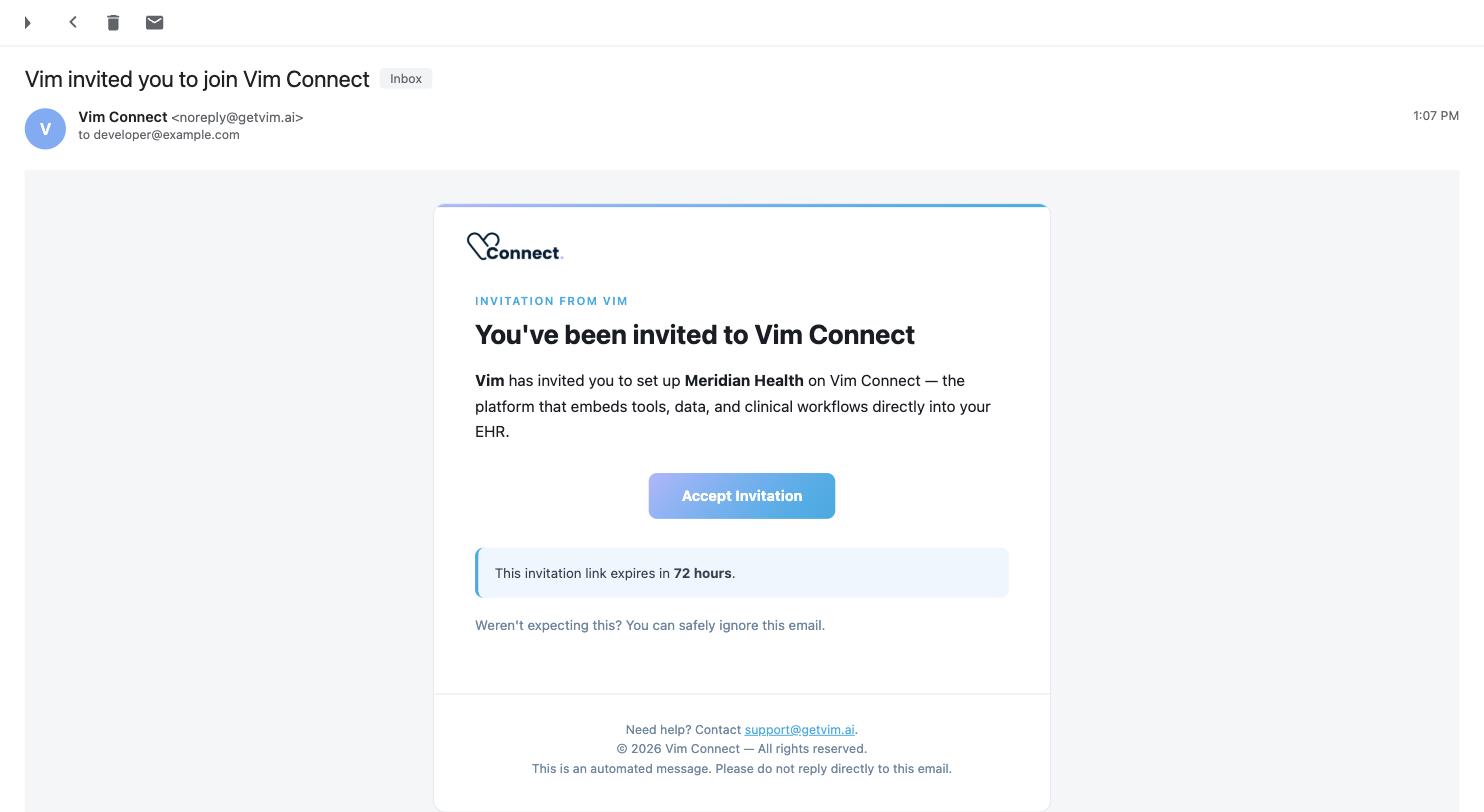
**The invitation email.**
Click
**Accept Invitation**
to start the onboarding wizard below.
> **Warning: The link expires in 72 hours**
>
> If it's expired, ask whoever invited you to resend it from Console — **Network → Invitations →
> Resend invitation**.
### Welcome [#welcome]
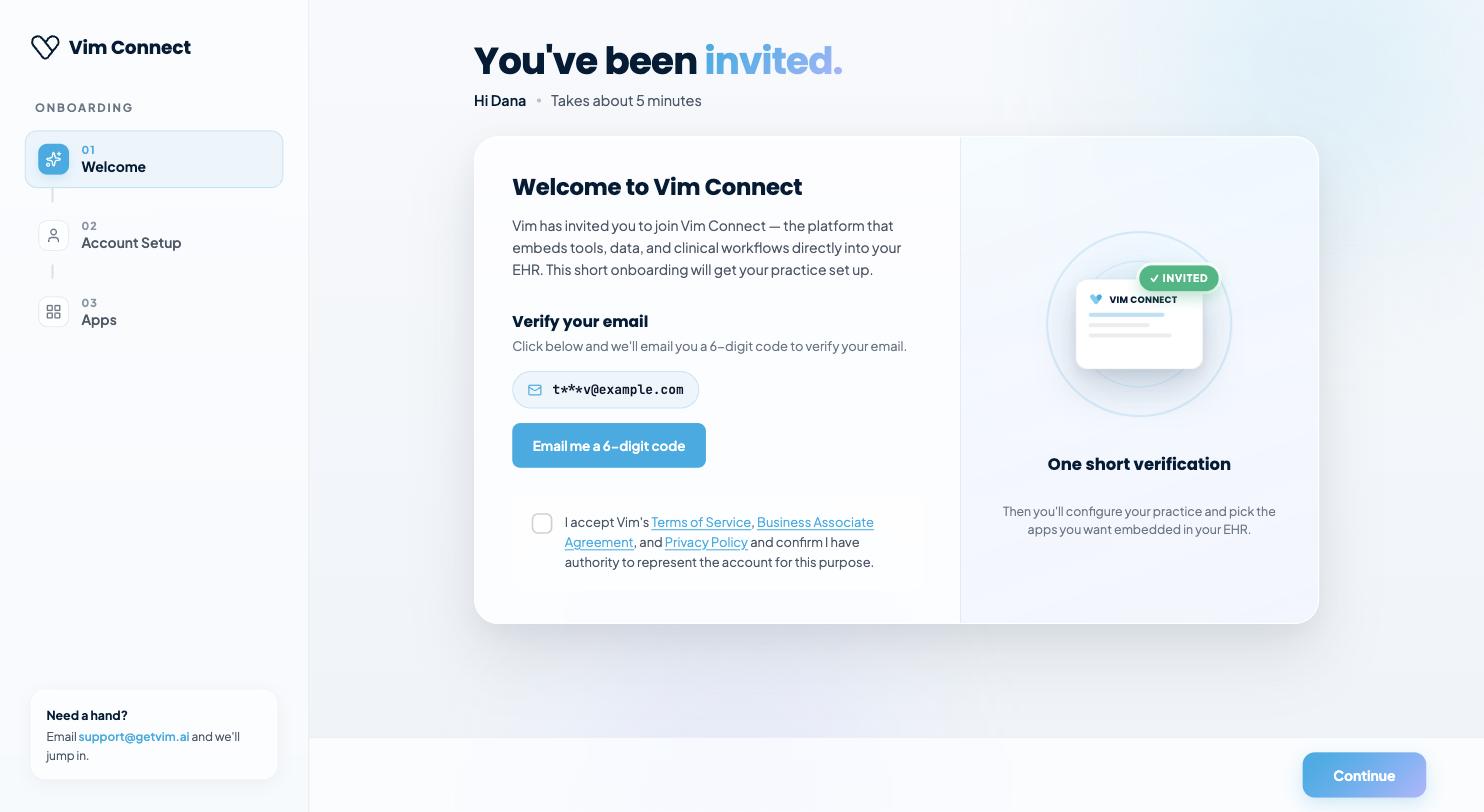
Verify your email with a 6-digit code, then accept the Terms of Service, Business Associate
Agreement and Privacy Policy.
**Welcome.**
Verify your email, then accept the standard agreements before continuing.
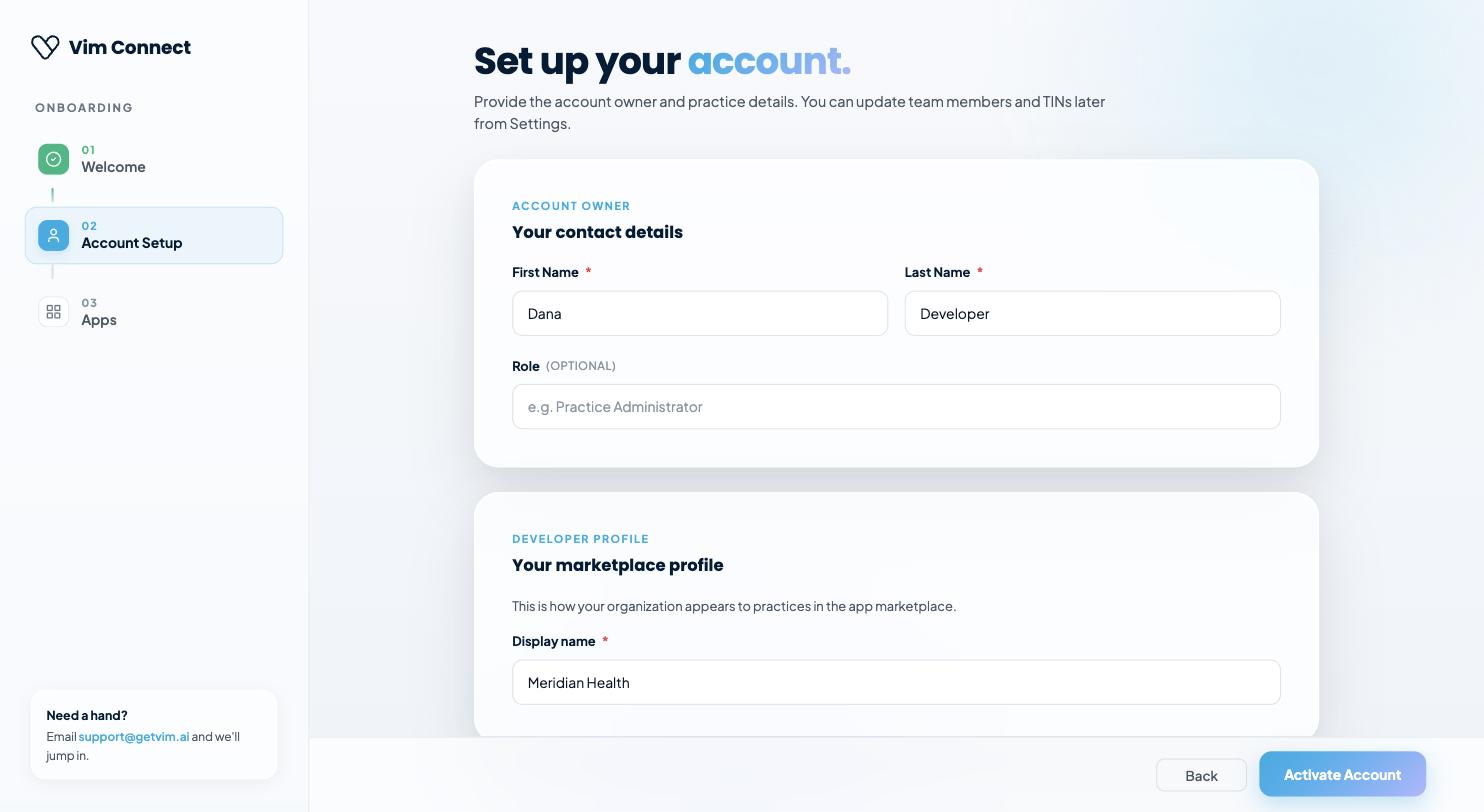
### Account Setup [#account-setup]
Provide your contact details (name, optional role) and your **developer marketplace profile** —
the display name practices see when they discover your app in the marketplace.
**Account Setup.**
Your contact details and the display name shown to practices browsing the marketplace.
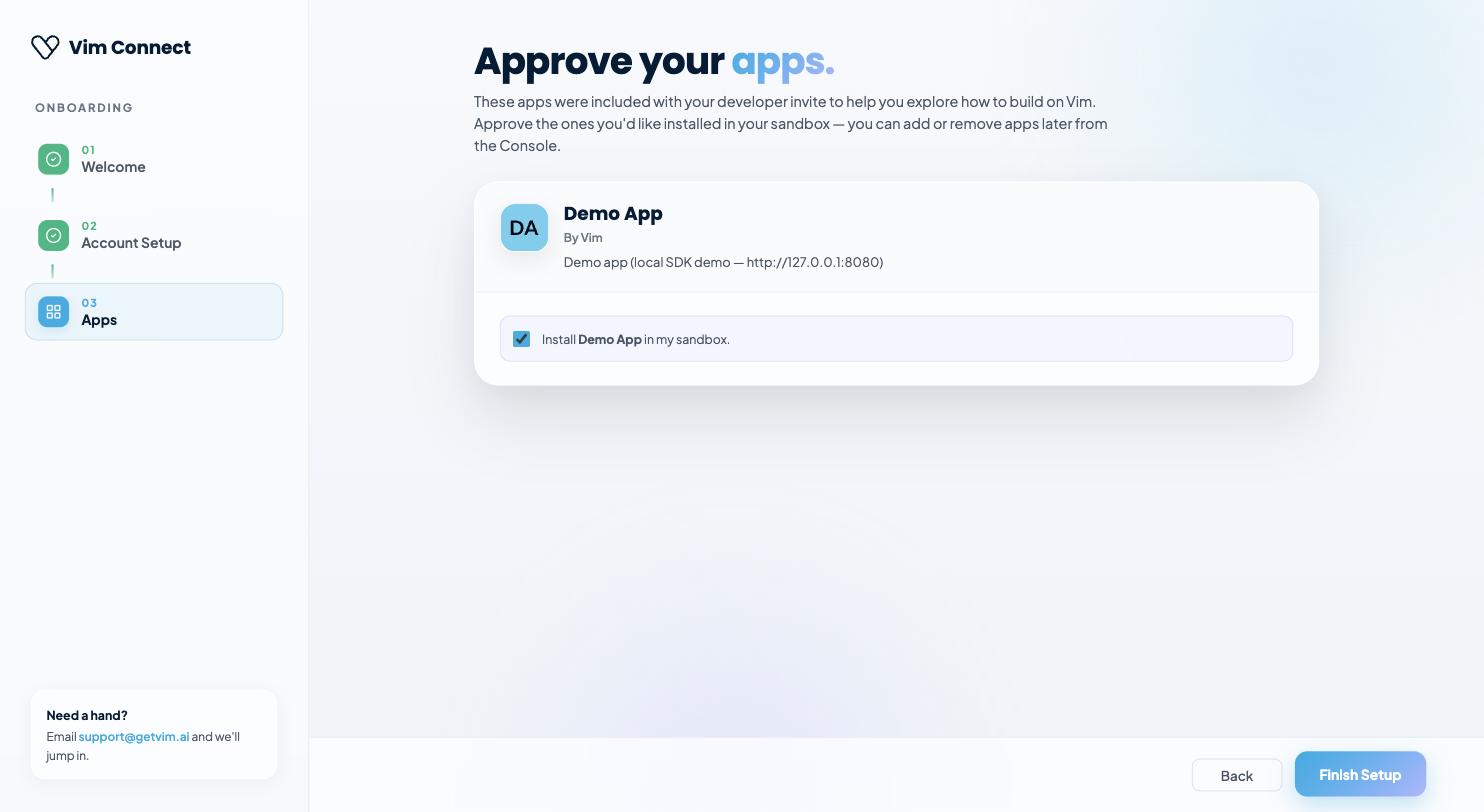
### Apps [#apps]
If your invitation included any pre-installed apps — most commonly the **Demo App**, so you have
a working example to explore immediately — approve the ones you want installed in your sandbox.
You can add or remove apps later from the Console.
**Apps.**
Pre-installed apps from your invitation — approve now, or manage them later in Console.
Finishing setup activates your account, which carries a **developer facet** and reveals the
**Build** section in the left navigation:
| Item | Purpose |
| --------------- | ----------------------------------------------------------- |
| **My Apps** | Every app you own, with its status |
| **Sandbox EHR** | Your isolated EHR instance for testing |
| **Resources** | SDK reference, this guide, the EHR Support Matrix, demo app |
## Creating an app [#creating-an-app]
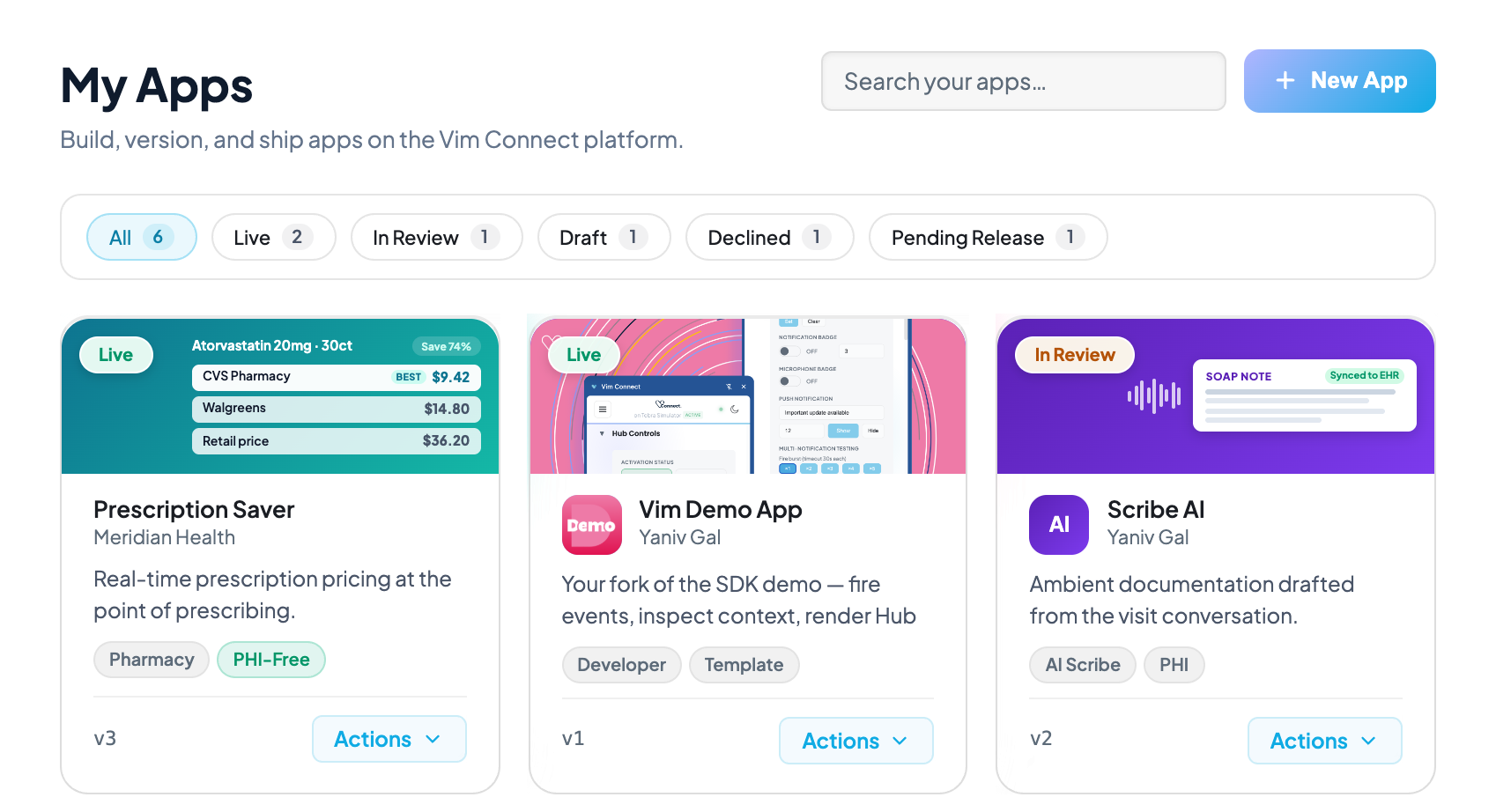
From **Build → My Apps**, choose **+ New App**. Vim creates the app with a placeholder name and
an empty **v1 draft**, then opens the manifest editor.
An app is a container; the thing you configure, submit and publish is a **version**. Versions
are numbered (`v1`, `v2`, …) and each carries its own manifest and submission answers.
You have two ways to start building:
* **From scratch**, if you're building a real product — implement the SDK integration yourself
against [Quick Start](/docs/getting-started/quick-start) and your own app architecture.
* **Fork the [Demo App](https://github.com/vimconnect/vim-demo-app)**, if you just want a working
proof of concept fast. It already implements the OAuth launch flow, SDK initialization, and the
core Hub/EHR capabilities — clone it, set its `CLIENT_ID` and `CLIENT_SECRET` environment
variables to the credentials from the environment you create below, and you have a running app
in the Sandbox EHR in minutes. Customize it from there instead of wiring the SDK up from zero.
**Build → My Apps.**
Each card shows its version and status.
**+ New App**
creates the app and opens the manifest editor on a fresh v1 draft.
## Inviting your team [#inviting-your-team]
Apps belong to the **account**, not to you personally — anyone you invite with the right role can
work on the same apps, so you don't need to share credentials.
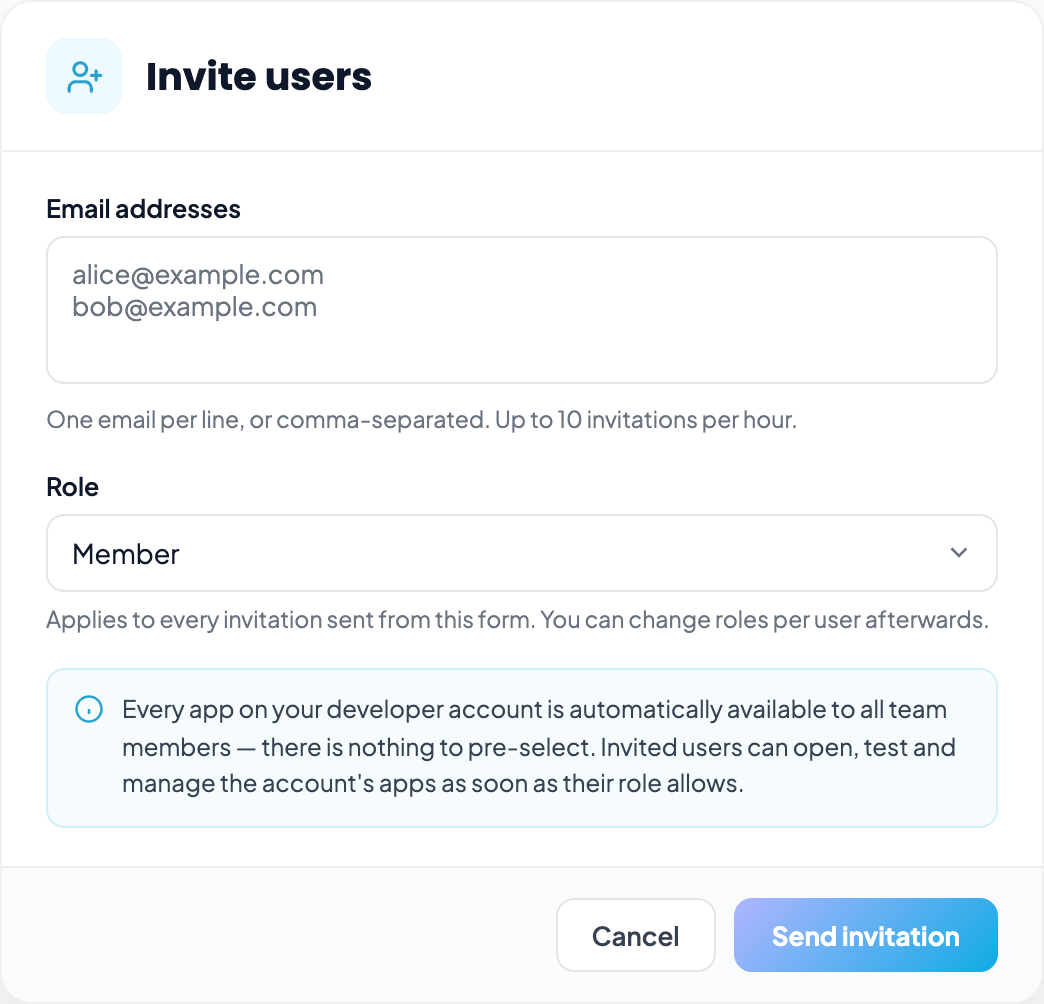
From **Users**, choose **Invite users**:
1. Enter one or more email addresses — one per line, or comma-separated.
2. Pick the **role** that applies to every invitation in this batch:
| Role | Can do |
| ---------- | ------------------------------------------------------------ |
| **Member** | Use apps installed for them; no Console administration |
| **Admin** | Manage apps, users and account settings |
| **Owner** | Everything an Admin can, plus billing and ownership transfer |
3. Optionally pre-select which **apps** the invited users get on day one. Apps marked for
auto-add are already selected.
**Invite users.**
Add one or more emails, pick the role that applies to the whole batch, and optionally pre-select which apps they get on day one.
Roles can be changed per user afterwards from the Users table — you don't need to re-invite
someone to promote them.
> **Note**
>
> For day-to-day development you only need one developer account. Invite teammates when you want
> shared ownership of the app, or when QA needs to exercise it in the Sandbox EHR.
## Filling in the manifest [#filling-in-the-manifest]
The manifest editor has four tabs. Changes save automatically as you type.
### Metadata [#metadata]
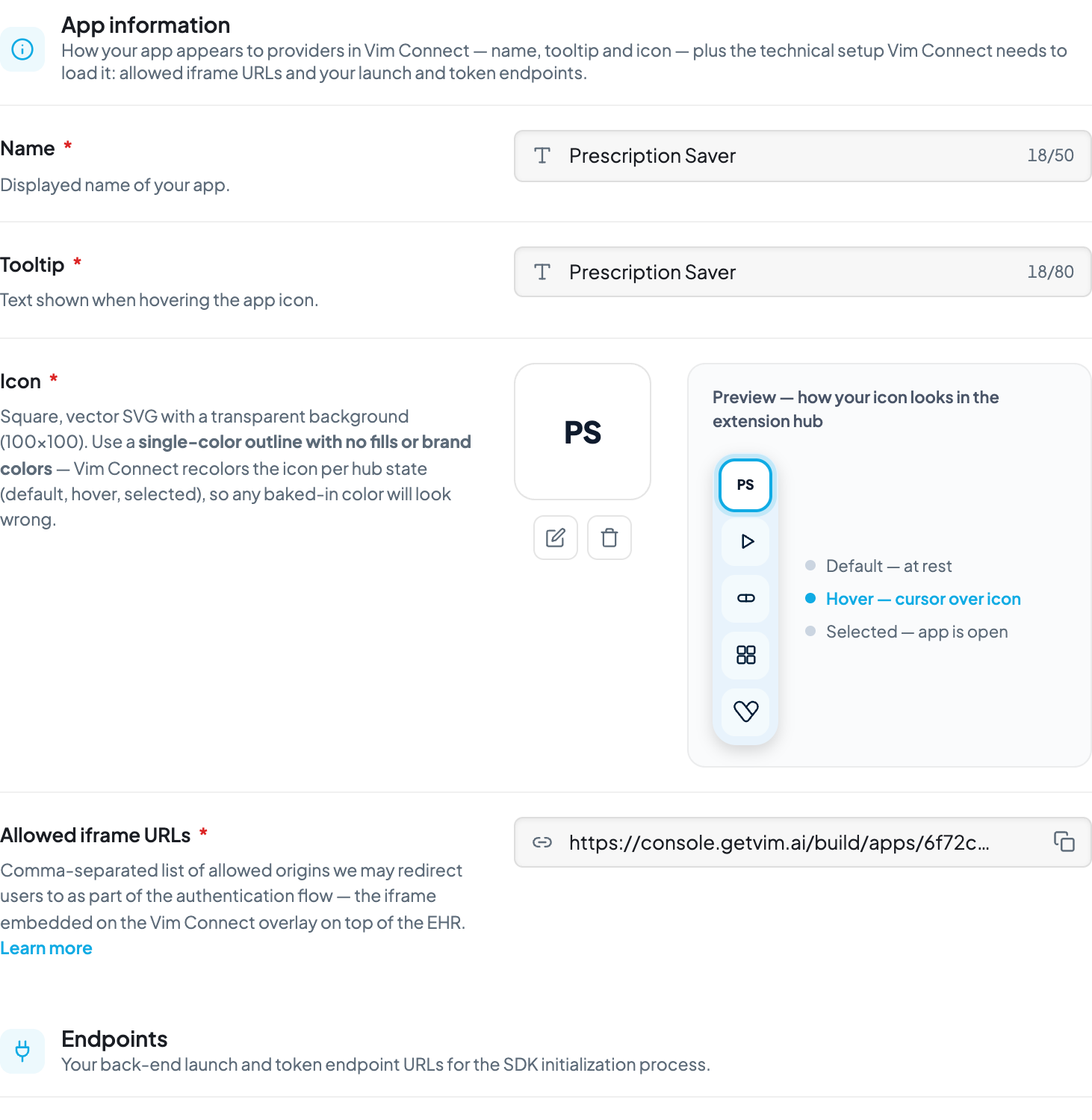
Your app's identity and the technical details Vim Connect needs to load it.
| Field | Notes |
| -------------------------- | ------------------------------------------------------------------------------------------------------------------------------------------------------------------- |
| **App name** | Shown to providers in the hub and to admins in the Console |
| **Tooltip** | Hover text on your hub icon (max 80 characters) |
| **Icon** | Square SVG, transparent background, 100×100. **Single-color outline, no fills or brand colors** — Vim recolors it per hub state, so baked-in color renders wrong |
| **Allowed iframe URLs** | Comma-separated origins you own that may be embedded, e.g. `http://localhost:3000, https://yourapp.com`. Must match the `redirect_uri` your launch endpoint returns |
| **Launch Endpoint** | Your backend endpoint Vim calls to begin the auth flow |
| **Token Endpoint** | Your backend endpoint that exchanges the authorization code for an access token |
| **Worker Launch Endpoint** | Optional. Only if you ship a [Worker App](/docs/worker-apps) |
**Manifest editor → Metadata.**
Identity and loading details — the tab bar above switches to App UX, EHR, and Entity Store.
See [Authentication](/docs/authentication) for how the launch and token endpoints fit together.
### App UX [#app-ux]
Toggle the hub capabilities your app uses — notification badge, push notifications, patient
details in the panel. Each toggle previews how it appears in the hub. Enable only what you use;
review asks you to justify each one. Reference: [Vim Hub](/docs/vim-hub).
### EHR [#ehr]
Declare the EHR data your app reads and writes, and the API operations it calls.
* **Fields** are selected per entity and sub-section — request the narrowest set you need.
* **Allowed PII** is a single toggle. While off, identifying fields are locked and
unselectable; turning it on unlocks them and each becomes something you justify at review.
* **API operations** are separate from field access. They let your app call the EHR
**outside the context of the open record** — for example fetching a full medication list when
that chart isn't on screen.
> **Note: Check coverage first**
>
> Consult the [EHR Support Matrix](/docs/ehr-support) before finalizing scopes. A field your
> target EHRs don't support will pass review and still fail in production.
### Entity Store [#entity-store]
Optional persistence for entities your app maintains across sessions.
## Getting your client ID and secret [#getting-your-client-id-and-secret]
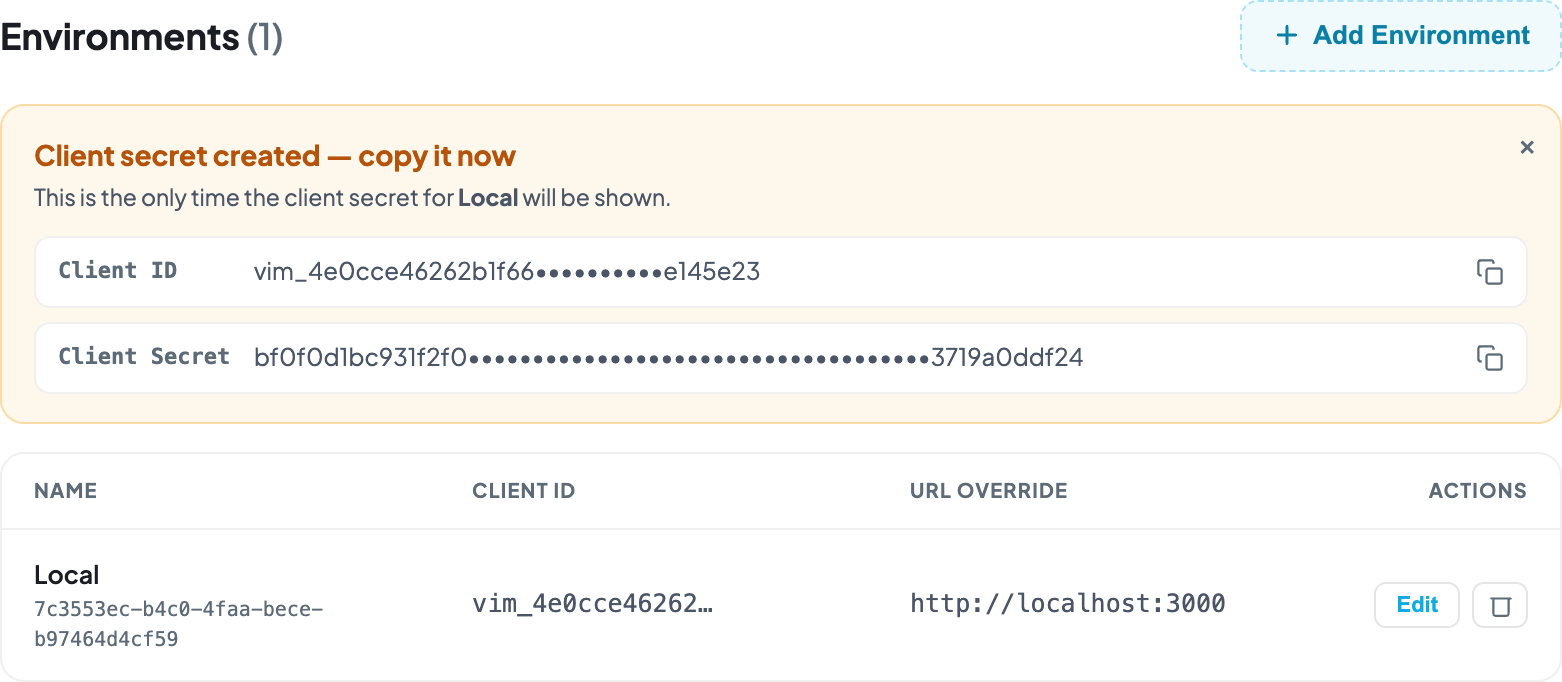
Credentials belong to an **environment**, not to the app — so you can hold separate credentials
for local development, staging and production.
From **Manage Versions → Environments**, choose **Add Environment**:
| Field | Notes |
| ---------------------------------- | ---------------------------------------------------------------------------------------------------------------------------------------------- |
| **Name** | e.g. `Local`, `Staging`, `Production` |
| **URL / Launch / Token overrides** | Optional per-environment overrides of the manifest values — point `Local` at `http://localhost:3000` without touching your production manifest |
On save, Vim shows your **Client ID** and **Client Secret**.
**Manage → Environments.**
The Client Secret is only ever shown at this moment, right after creating the environment.
> **Warning: The secret is shown once**
>
> The client secret is displayed a single time, at creation, and stored hashed. Copy it into your
> environment configuration immediately. If you lose it, create a new environment — it cannot be
> retrieved.
Supply both to your backend as `CLIENT_ID` and `CLIENT_SECRET` for the token exchange described
in [Authentication](/docs/authentication).
## Testing against the Sandbox EHR [#testing-against-the-sandbox-ehr]
Your account includes an isolated **Sandbox EHR** — a working EHR with synthetic patients and
**no real PHI**. It is the only place to exercise your app end to end before review.
### Setting it up [#setting-it-up]
1. Open **Build → Sandbox EHR** in the Console. It opens in a new tab.
2. Install the **Vim Connect browser extension** — this is what injects the overlay and hub into
the EHR page. Without it, your app has nothing to load into.
3. Sign in to the extension with the same Console account.
4. Confirm the extension reports a detected EHR system. If it says no EHR detected, you are not
on a page the adapter recognizes.
### What to test [#what-to-test]
* **Every workflow event you subscribe to** — open a chart, open an encounter, and confirm your
handlers fire with the context you expect.
* **Missing fields.** EHR coverage varies, so a field present in the sandbox may be absent in a
production EHR. Verify your app degrades rather than throws — see
[Error Handling](/docs/error-handling) and the [EHR Support Matrix](/docs/ehr-support).
* **Hub presence** — badge counts, activation state and push notifications, per
[Vim Hub](/docs/vim-hub).
* **Writeback**, if you use it: confirm the consent prompt appears and that a declined request
is handled.
> **Warning: The sandbox is not a coverage guarantee**
>
> The Sandbox EHR supports a broad set of capabilities, so something working there does not mean
> every production EHR supports it. Always confirm against the
> [EHR Support Matrix](/docs/ehr-support) before you submit.
## Managing versions [#managing-versions]
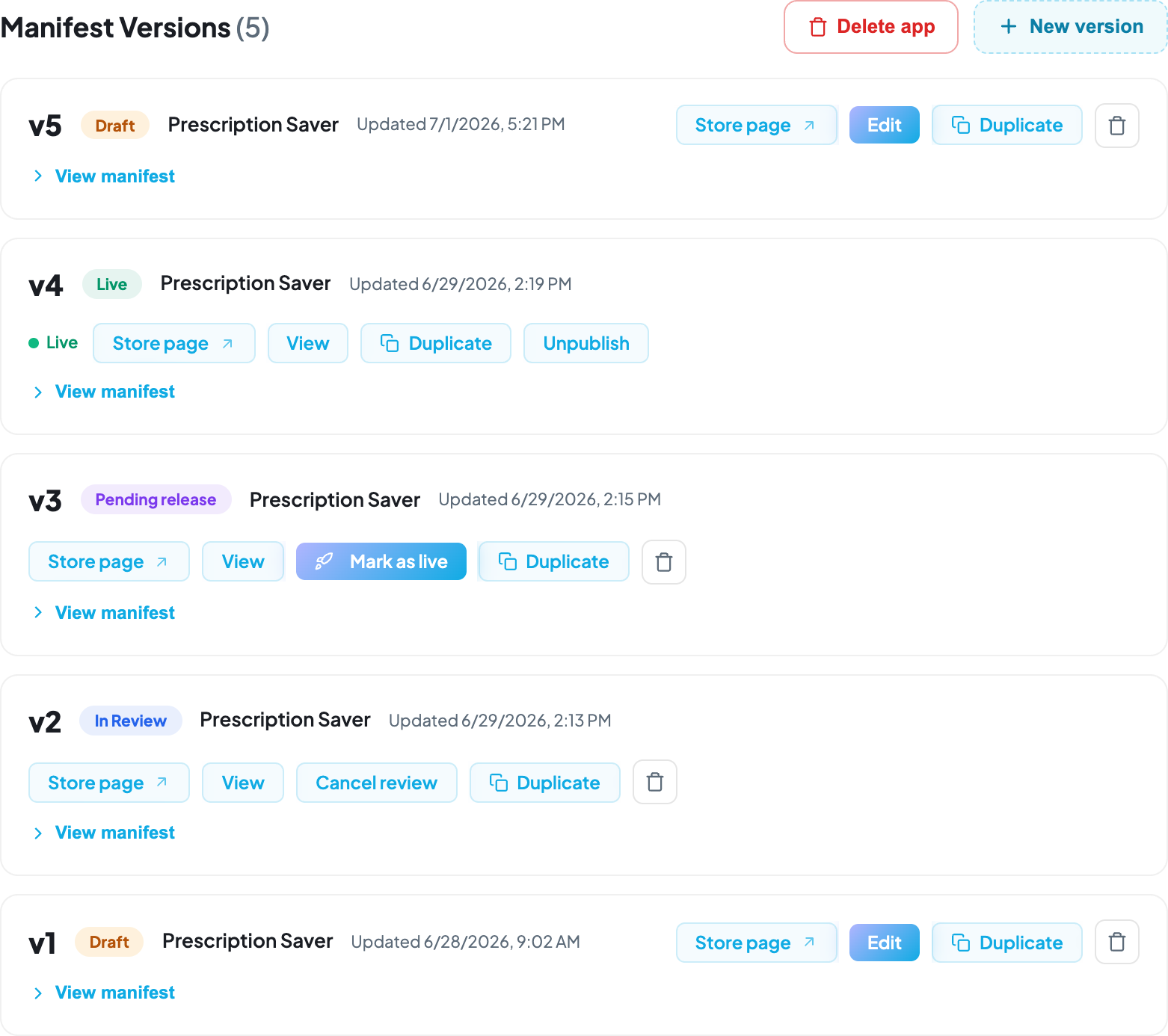
**Manage Versions** lists every version with its status and the actions available:
| Status | What it means | Actions |
| ------------------- | --------------------------------------- | ----------------------------------- |
| **Draft** | Editable, never submitted | View/Edit · Duplicate · Delete |
| **In Review** | With the Vim review team; locked | View · Cancel review · Duplicate |
| **Pending release** | Approved, not yet published | View · **Mark as live** · Duplicate |
| **Live** | Published in the marketplace | View · Unpublish · Duplicate |
| **Declined** | Review concluded with changes requested | View feedback · Duplicate |
**Manage Versions.**
Every version of the app, with the actions available for its current status.
**Only Draft versions are editable.** Any other status is read-only: you can browse every tab,
but fields are disabled. To iterate on a submitted or live version, **duplicate** it — the copy
is a fresh draft carrying all your manifest values and submission answers.
## Submitting for review [#submitting-for-review]
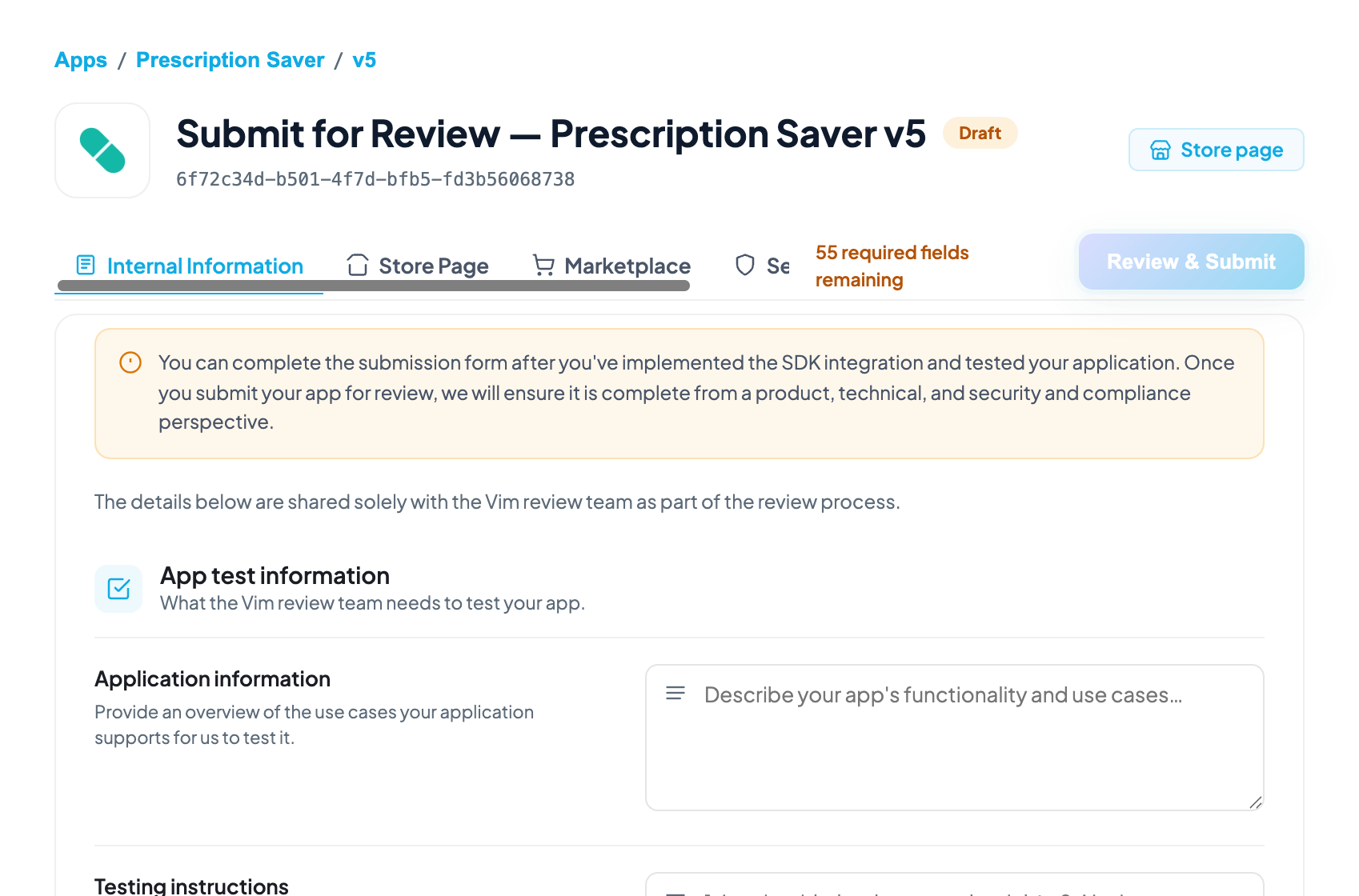
Open the submission form from the manifest. It has four sections, and every field is required
unless marked optional or gated behind a "No" answer. Hovering the disabled **Review & Submit**
button lists exactly what's still missing — but it's faster to gather everything up front. This
section is a prep guide to what's asked in each and why.
**Submission form.**
The four section tabs, and the gated
**Review & Submit**
button — disabled until every required field across all four is complete.
### Internal Information [#internal-information]
Shared only with the Vim review team — never shown on your public listing.
| Group | Asks for | Why |
| -------------------------------------------- | ---------------------------------------------------------------------------------------------------------------------------------------------------------------------------------------------- | -------------------------------------------------------------------------------------------------------------------------------------------------------------------- |
| **App Test Information** | What your app does, step-by-step testing instructions, an optional demo video | Reviewers can't guess your workflow — clear instructions using **synthetic data only** (no real PHI) are what let them actually exercise the app instead of guessing |
| **Demo User Details** *(optional)* | A username/password for your app | Only needed if your app hasn't implemented SSO or auto-provisioning — gives the reviewer a way in |
| **Patient Details** *(optional)* | A non-PHI test patient, or your activation criteria (e.g. "any patient in an encounter") | Lets the reviewer land on a patient your app actually activates for, in the Sandbox EHR |
| **EHR Permission Usage** | A justification for each EHR resource you read or write, and any chart-retrieval requests | Reviewers check this against the scopes you declared in the manifest's EHR tab — an access request with no stated use case is the most common reason review stalls |
| **App UX** | A justification for each Vim Hub feature you enabled (badges, notifications, etc.) | Same idea as EHR scopes — enable and justify only what you use |
| **Technical Contacts** | Email(s) for your engineering point of contact | Where review questions go if something's unclear |
| **Internal Assessment** | Security, compliance, healthcare-regulatory, and AI/ML questions — third-party data access, breach history, HIPAA compliance, FDA/medical-device status, litigation history, AI model behavior | Vim's internal risk review. Private — none of this appears on your listing |
> **Note: Justify scopes, don't just declare them**
>
> The single most avoidable review delay is a permission with no stated use case. If your manifest
> requests a field or Hub feature, the Internal Information section is where you explain why —
> answer it as you fill in the manifest, not as an afterthought at submission time.
### Store Page [#store-page]
Your public marketplace listing.
| Group | Asks for |
| ---------------------------------- | ----------------------------------------------------------------------------------------------------------------------------------- |
| **Description** | Listing icon (colored backgrounds allowed here, unlike the Hub icon), brand color, a short one-line summary, and a full description |
| **Media** | Screenshots or video shown on your listing |
| **Categories** | Where your app is discoverable in the marketplace |
| **Buttons** *(optional)* | Primary/secondary call-to-action links (e.g. "Get Started", "Learn More") |
| **Legal** | Privacy Policy URL, Terms of Service URL, and your BAA (or a stated reason for not sharing it publicly) |
| **Resources** | Developer name, address, phone, website, support email, and a network-request email for data-access requests |
### Marketplace [#marketplace]
**Visibility**, **Pricing**, and **Distribution Level** — who can find and install your app, and
under what commercial terms.
### Security [#security]
Shown publicly in the Applications section for transparency to any account considering your app —
unlike Internal Information, this section is visible to end users. It covers HIPAA compliance,
PHI handling and offshoring, data protection (encryption, retention, de-identification), security
practices (secure SDLC, penetration testing, access controls, audit logging), and AI/PHI
processing. Submitting confirms you agree to the Application Developer Terms of Service and
Security Best Practices linked in the form.
> **Warning: You own this content**
>
> Vim reviews every submission for functionality and baseline security, but does not endorse or
> certify your app. The security and compliance answers are yours — keep them accurate, since
> they're what an installing organization sees.
The form also shows read-only summaries of your **EHR data access** and **App UX** selections,
pulled from the manifest, so you can see precisely what you're being asked to justify.
Submitting **locks the version** for the duration of the review — typically up to **10 business
days**, with an email update within 7.
## Going live [#going-live]
When review passes, the version moves to **Pending release** and you decide when to ship. Open
**Manage Versions** and find the version carrying that status — it is the only one that offers
**Mark as live**:
**Manage Versions.**
The row carrying
**Pending release**
status is the only one offering
**Mark as live**
.
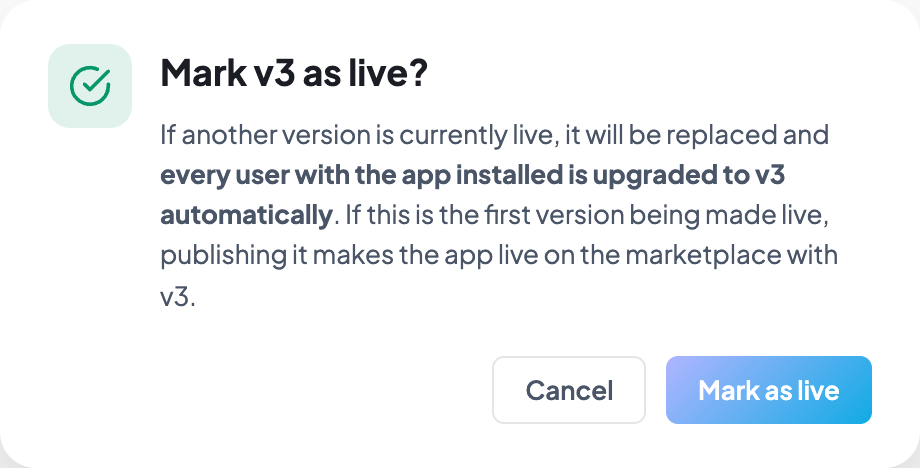
Selecting it opens a confirmation that states the effect before anything ships:
The
**Mark as live**
confirmation spells out the effect before you publish.
* If another version is already live, it is replaced and **every user with your app installed
is upgraded automatically**.
* If this is your first live version, publishing it makes the app live in the marketplace.
If review concludes with changes requested, the email links to the reviewer's notes in Console.
Answer them on the submission, or duplicate the version into a new draft if the manifest itself
needs to change, then resubmit.
---
# EHR Support Matrix (/docs/ehr-support)
Vim normalizes EHR differences, but it cannot invent capabilities an EHR doesn't expose.
Coverage varies: an event or field available in one EHR may be absent in another.
This page is the authoritative view of what each supported EHR can do. It is generated from
Vim's live adapter configuration, so it reflects current production behaviour rather than a
hand-maintained table.
> **Note: Read this before finalizing your manifest**
>
> The most common avoidable integration failure is declaring an EHR scope your target EHRs don't
> support. Confirm coverage here first — a missing field passes review and then fails silently in
> production.
## How to read the matrix [#how-to-read-the-matrix]
Capabilities are grouped by **workflow event**, then by **entity**, then by **field**. Each EHR
gets a column, and a marked cell means that EHR supports that capability.
Cells are colour-coded by state, and hovering one names its state:
* **Readable** — the field is extracted and available to your app.
* **API implemented** — the API operation is available for this EHR.
* **Partially implemented** — the operation exists but covers only a subset of its fields.
* **Readable & Writable** — also writable via [Writeback](/docs/ehr-connectivity/writeback).
An empty cell means unsupported. Treat every field as potentially absent and handle `null`
defensively — see [Error Handling](/docs/error-handling).
> **Warning: Write support is not yet reflected here**
>
> The matrix currently reports read support only; no cell resolves to *Readable & Writable* yet.
> Confirm write capability with your Vim contact before depending on it, and see
> [Writeback](/docs/ehr-connectivity/writeback) for what is supported today.
## What determines support [#what-determines-support]
Support is derived from Vim's adapter configuration, not declared by hand:
* **Event detection** — the EHR's adapter maps a UI component to that workflow event.
* **Field readability** — a component firing that event has an extractor for the field.
* **API operations** — the EHR has an implemented automation for that catalog entry. *Partial*
means only some of the operation's fields are covered.
This is why the matrix is per-event rather than a flat field list: the same field may be
available on `encounter_open` but not on `chart_open`, because different EHR screens expose
different data.
> **Warning: Interactive matrix coming soon**
>
> The interactive support matrix renders here once it's available. Until then, confirm current
> per-EHR coverage with your Vim contact rather than relying on a table on this page.
## Using it in practice [#using-it-in-practice]
**Choose your baseline.** Decide which EHRs you must support at launch, then filter to just
those columns. A capability supported by only one EHR is a differentiator, not a foundation.
**Design for the intersection.** Build your core flow on capabilities all your target EHRs
support; treat the rest as progressive enhancement, enabled at runtime when the data is present.
**Re-check before each submission.** Coverage expands as adapters improve. A field unsupported
when you built may be available now.
## Related [#related]
* [EHR Connectivity](/docs/ehr-connectivity) — how to read the data listed here
* [Workflow Events](/docs/ehr-connectivity/workflow-events) — the events used to group this matrix
* [Writeback](/docs/ehr-connectivity/writeback) — writing to the fields marked writable
* [Managing Your Developer Account](/docs/developer-account) — declaring these scopes in your manifest
---
# Error Handling & Troubleshooting (/docs/error-handling)
## SDK Errors [#sdk-errors]
The SDK throws `SDKError` for runtime and validation failures. Each error has a `code` and optional `details`:
```typescript
import { SDKError } from '@vimconnect/app-sdk';
try {
await sdk.ehr.context.encounter.update({ cc: 'Headache' });
} catch (err) {
if (err instanceof SDKError) {
console.error(`[${err.code}] ${err.message}`, err.details);
switch (err.code) {
case 'ENTITY_NOT_IN_CONTEXT':
// No active encounter — wait for context
break;
case 'PERMISSION_REQUIRED':
// Need to request permission first
break;
case 'OPERATION_NOT_CONFIGURED':
// This EHR doesn't support this operation
break;
}
}
}
```
## Error Codes [#error-codes]
Every SDK error is an `SDKError` carrying a `code`. Switch on `code`, not on the message.
Codes below are the `SDKErrorCode` union, plus `NO_WORKER` — which the runtime throws but the union
does not yet declare, so TypeScript will not autocomplete it.
### Connection and initialization [#connection-and-initialization]
| Code | When | How to handle |
| --------------------------- | -------------------------------------------------------------------------------------- | --------------------------------------------------------------------------------- |
| `EXTENSION_NOT_FOUND` | No Vim Connect extension responded to the handshake | Ask the provider to install the extension, or confirm the page is a supported EHR |
| `EXTENSION_UPDATE_REQUIRED` | The installed extension is older than this SDK needs | Prompt the provider to update the extension |
| `HANDSHAKE_TIMEOUT` | The extension did not answer the initial handshake in time | Retry once; then surface a connection error. Tune with `handshakeTimeout` |
| `CONNECTION_TIMEOUT` | The SDK could not connect within the timeout | Ensure the extension is installed and the page is a supported EHR |
| `TIMEOUT` | An individual request exceeded `requestTimeout` | Retry; a catalog operation may be slow. Default is 40s |
| `WRONG_CONTEXT` | `initVimSDK()` was called from the wrong surface — e.g. the UI initializer in a worker | Use `initWorkerVimSDK()` in Worker Apps |
| `BRIDGE_INIT_ERROR` | The message bridge to the extension failed to start | Reload the app frame |
| `INIT_ERROR` | Initialization failed for a reason not covered above | Log the cause and surface a generic connection error |
| `NOT_CONNECTED` | An SDK call was made before the connection was established | Await `initVimSDK()`, and `waitUntilReady()` before reading the manifest |
### Tokens [#tokens]
| Code | When | How to handle |
| ------------------------- | --------------------------------------------------------------------------------------------------------------------- | ------------------------------------------------------------------------------------------------------------------------------ |
| `MISSING_ACCESS_TOKEN` | No `accessToken` was supplied and no `token_endpoint` was found in the page URL | Pass `accessToken`, or register a token endpoint |
| `TOKEN_REQUIRED` | A call needed an access token that was never provided | Same as above |
| `INVALID_TOKEN_ENDPOINT` | The `token_endpoint` parameter is not an HTTPS URL with a public hostname — it is a safety check, not a parse failure | Serve your token endpoint over HTTPS on a publicly resolvable host; `localhost` and private hosts are rejected |
| `MISSING_TOKEN_CODE` | The token endpoint flow ran with no authorization `code` | Confirm the OAuth redirect carried `code`; codes are single-use |
| `TOKEN_FETCH_ERROR` | The token endpoint call failed or returned no `access_token` | Check your endpoint's response shape and status |
| `TOKEN_VALIDATION_FAILED` | The access token was rejected | Re-launch the app to obtain a fresh one; there is no refresh flow |
| `ID_TOKEN_UNAVAILABLE` | `getIdToken()` was called but the SDK holds no `id_token` | Use the token endpoint flow, or pass `idToken` to `initVimSDK()` — see [Token Lifecycle](/docs/authentication#token-lifecycle) |
### Context and writeback [#context-and-writeback]
| Code | When | How to handle |
| -------------------------- | ----------------------------------------------------------------------------------------------------- | --------------------------------------------------------- |
| `ENTITY_NOT_IN_CONTEXT` | Tried to read or update an entity that is not in the current context | Wait for a context change event before writing |
| `OPERATION_NOT_CONFIGURED` | The operation is not available for this EHR system | Check `getCapability()` before attempting updates |
| `PERMISSION_REQUIRED` | Attempted a disruptive update without permission | Call `requestPermission()` first |
| `PERMISSION_DENIED` | The write targets a field your manifest does not grant | Widen the manifest scope — no prompt can satisfy this |
| `INVALID_FIELDS` | Invalid field paths in a permission request or update | Verify field paths against the manifest |
| `INVALID_DATA` | The update payload failed validation | Validate against the entity's Zod schema before sending |
| `INVALID_OPERATION` | The operation name is not valid for this entity | Check `getManifest().operations` |
| `VALIDATION_ERROR` | A call argument failed validation — an invalid event name, or a non-serializable or oversized payload | Fix the argument; `launchPayload` is capped at 20 KB |
| `NO_WORKER` | `sdk.appEvents.send()` was called by a single-surface app with no Worker App to receive the event | Only send app events from an app that ships both surfaces |
### Catalog and manifest [#catalog-and-manifest]
| Code | When | How to handle |
| ---------------------------- | ---------------------------------------------------------- | ---------------------------------------------------- |
| `MANIFEST_NOT_AVAILABLE` | `getManifest()` was called before the SDK was ready | Await `waitUntilReady()` |
| `NOT_EXISTS` | Referenced an operation that does not exist in the catalog | Verify the operation name |
| `NOT_IMPLEMENTED` | The operation exists but is not implemented for this EHR | Use `getManifest().operations` to check availability |
| `MISSING_REQUIRED_PARAMETER` | A required parameter was omitted | Check the method signature |
## Defensive Patterns [#defensive-patterns]
### Check Capabilities Before Writing [#check-capabilities-before-writing]
Always check if an operation is available before attempting it:
```typescript
const cap = sdk.ehr.context.encounter.getCapability('update');
if (!cap.available) {
// cap.reason tells you why:
// - 'not_in_context': no active encounter
// - 'not_configured': this EHR doesn't support encounter updates
console.log('Cannot update encounter:', cap.reason);
return;
}
// Safe to proceed
if (cap.permissionState === 'granted' || !cap.disruptive) {
await sdk.ehr.context.encounter.update(data);
}
```
### Wrap Context Subscriptions [#wrap-context-subscriptions]
Not all context keys are available on every EHR. Wrap subscriptions in try-catch:
```typescript
const manifest = sdk.ehr.getManifest();
for (const ctx of manifest.supportedContexts) {
try {
sdk.ehr.context.onChange(ctx.contextKey, (prev, curr) => {
// Handle context change
});
} catch (err) {
console.warn(`Could not subscribe to ${ctx.contextKey}:`, err);
}
}
```
### Guard Against Stale Async Results [#guard-against-stale-async-results]
If your component unmounts or the context changes while an async operation is in flight, the result may be stale:
```typescript
useEffect(() => {
let cancelled = false;
const unsubscribe = sdk.ehr.context.onChange('chart_open:patient', async (prev, curr) => {
if (!curr) return;
const result = await sdk.ehr.api.patient.getPatient();
if (cancelled) return; // component unmounted or context changed
setPatientData(result.data);
});
return () => {
cancelled = true;
unsubscribe();
};
}, [sdk]);
```
## Troubleshooting [#troubleshooting]
### "SDK not ready" or Connection Timeout [#sdk-not-ready-or-connection-timeout]
**Symptoms:** `initVimSDK()` throws or hangs, `CONNECTION_TIMEOUT` error.
**Causes:**
* The Vim Connect Chrome extension is not installed
* The current page is not a supported EHR
* The extension is disabled or crashed
**Solutions:**
1. Verify the Chrome extension is installed and enabled at `chrome://extensions`
2. Confirm you're on a supported EHR page
3. Try reloading the page
4. Check the browser console for extension errors
### "Missing launch\_id" on Launch Page [#missing-launch_id-on-launch-page]
**Symptoms:** Your launch page shows an error about missing `launch_id`.
**Causes:**
* Navigating to the launch page directly instead of through the Vim Hub
* The app URL is misconfigured on the Vim platform
**Solutions:**
1. Always launch through the Vim Hub — don't navigate directly to `/launch`
2. Verify your app's launch URL is correctly configured on the Vim platform
### OAuth Token Exchange Fails [#oauth-token-exchange-fails]
**Symptoms:** 401 or 400 error from `/app-auth/token`.
**Causes:**
* Invalid or expired authorization code (codes are single-use)
* Wrong `client_id` or `client_secret`
* Mismatched `redirect_uri` (must exactly match the registered URL)
* Using staging credentials against production backend, or vice versa
**Solutions:**
1. Verify `NEXT_PUBLIC_CLIENT_ID` and `CLIENT_SECRET` match your app registration
2. Ensure `NEXT_PUBLIC_ENV` matches the environment your app is registered in
3. Check that your `redirect_uri` exactly matches the registered callback URL
4. Re-launch the app to get a fresh authorization code
### Context Data is Empty [#context-data-is-empty]
**Symptoms:** `onChange` fires but `curr.fields` is empty or missing expected data.
**Causes:**
* The EHR hasn't finished loading the data yet
* The field isn't available for this specific EHR system
**Solutions:**
1. Context updates fire progressively — fields populate as the extension extracts them. Wait for subsequent updates.
2. Check `sdk.ehr.getManifest().supportedEntities` to see which fields are available for the current EHR.
### Writeback Has No Effect [#writeback-has-no-effect]
**Symptoms:** `update()` returns success but the EHR doesn't change.
**Causes:**
* The provider is on a read-only screen
* The EHR requires specific navigation state for writeback
* The field isn't writable for this EHR configuration
**Solutions:**
1. Check `getCapability('update')` — if `available` is `false`, the current screen doesn't support it
2. Verify the field path matches what the manifest reports as writable
3. Check `getManifest().contextWriteback` for the entity's `updatableFields` list
### Debug Mode [#debug-mode]
Enable debug logging to see all SDK communication:
```typescript
const sdk = await initVimSDK({ debug: true });
```
This logs all messages between your app and the extension to the browser console, including:
* Event dispatches
* Context updates
* API calls and responses
* Permission requests
---
# Build with an AI Agent (/docs/getting-started/ai-tooling)
The SDK's type surface is **generated from the platform's official collection**, not
hand-written, and it changes between releases. An agent working from memory invents a
`getPatientProblems()` that does not exist, or reaches for `patient.dob` when the field is
`patient.demographics.dateOfBirth`. Both look right in review and fail at runtime.
Install the skill and your agent looks the answer up instead.
## Claude Code [#claude-code]
`@vimconnect/app-sdk` ships a skill named **`vim-app-sdk-docs`**. Copy it into your project:
```bash
mkdir -p .claude/skills
cp -r node_modules/@vimconnect/app-sdk/skills/vim-app-sdk-docs .claude/skills/vim-app-sdk-docs
```
That is the whole setup. From then on, whenever you ask Claude to build, fix, or explain
anything touching `initVimSDK`, `sdk.ehr.*`, workflow events, or writeback, it fetches the
current reference before answering rather than recalling an older one.
> **Note: Re-copy after an SDK upgrade**
>
> The skill is a file in your repo, so it does not update itself. `cp` it again after you
> bump `@vimconnect/app-sdk` to pick up changes to the skill.
## Other agents [#other-agents]
No skill format required — point your agent at these URLs and tell it to read them before
writing SDK code:
* [`/llms-full.txt`](/llms-full.txt) — every page on this site as plain markdown
* [`/collection/api-reference.json`](/collection/api-reference.json) — the generated entity
types, events, context keys, and method signatures
Fetch **both**. The API reference tables render client-side from the JSON, so `llms-full.txt`
carries the guides and worked examples but points at the JSON for the exact names and
signatures rather than inlining them.
Every page here also has a **Copy as Markdown** button when you want to hand over one page
instead of the whole reference.
## Machine-readable resources [#machine-readable-resources]
* [`/llms.txt`](/llms.txt) — one-line summary of every page, grouped by section
* [`/llms-full.txt`](/llms-full.txt) — the full documentation as one markdown file
* [`/collection/api-reference.json`](/collection/api-reference.json) — the generated API reference
## Next Steps [#next-steps]
* [Start from the Demo App](/docs/getting-started/demo-app) — a working app that already uses the real surface
* [Quick Start](/docs/getting-started/quick-start) — build a minimal app from scratch
* [API Reference](/docs/api-reference) — the human-readable version of the JSON above
---
# Start from the Demo App (/docs/getting-started/demo-app)
The [Demo App](https://github.com/vimconnect/vim-demo-app) is a public GitHub template: a
complete Next.js Vim app with the OAuth flow, SDK initialization, and an **SDK Explorer**
that drives every capability your manifest declares. Forking it is the fastest way to see
real EHR data flowing through the SDK — and the fastest way to find out whether a
capability you need is actually available in the EHR you care about.
```bash
gh repo create my-vim-app --template vimconnect/vim-demo-app --private --clone
cd my-vim-app
npm install
```
Then set the three required variables and run it:
```bash
APP_ENV=local # local | staging | production
CLIENT_ID=your_client_id
CLIENT_SECRET=your_client_secret # server-only, never exposed to the browser
```
```bash
npm run dev # http://localhost:8080
```
Your client ID and secret come from an environment on your app in the Vim Console — see
[Getting your client ID and secret](/docs/developer-account#getting-your-client-id-and-secret).
The app **fails fast** with a named error if any required variable is missing, rather than
falling back to a default and misbehaving later.
## What it demonstrates [#what-it-demonstrates]
* **The full OAuth handshake** — `/launch` receives the `launch_id`, redirects to Vim's
authorize endpoint, exchanges the code for a token server-side at `/token`, then
initializes the SDK. This is the flow described in [Authentication](/docs/authentication),
written out end to end.
* **The SDK Explorer** — it reads the operations your app manifest declares, watches live
EHR context, and the moment the context surfaces the ids an operation needs, it fires
that read and shows you the raw response. Writes never auto-fire; they arm and wait for
an explicit click.
* **Capability and permission handling** — every call goes through the same
`getCapability` / `hasPermission` checks your app should be doing, so you can see
exactly what a given EHR does and does not support.
* **Worker apps and the offscreen surface** — `/offscreen` covers the headless variant
described in [Worker Apps](/docs/worker-apps).
## Fork it, or start from scratch? [#fork-it-or-start-from-scratch]
**Fork the Demo App** when you want to see the platform working before you commit to a
design, when you are evaluating which capabilities a target EHR actually implements, or
when you are debugging your own app and need a known-good reference to compare against.
**Follow the [Quick Start](/docs/getting-started/quick-start)** when you already know what
you are building and want the minimum viable app — it builds the launch page, the token
exchange, and a single chart-open subscription from an empty `create-next-app`, with
nothing else in the way.
Most teams do both: fork the demo app to learn the surface, then start their real app
from the Quick Start.
## Next Steps [#next-steps]
* [Using These Docs with AI](/docs/getting-started/ai-tooling) — point your coding agent at the real reference
* [Testing against the Sandbox EHR](/docs/developer-account#testing-against-the-sandbox-ehr) — run your fork against a real EHR context
* [EHR Support Matrix](/docs/ehr-support) — which capabilities exist in which EHR
---
# Installation & Setup (/docs/getting-started)
## Prerequisites [#prerequisites]
Before you start building, make sure you have:
* **Node.js 18+** and a package manager (npm, yarn, or pnpm)
* **A Vim Connect developer account** — contact your Vim representative to get one
* **A registered application** — your app must be registered on the Vim Connect platform with an OAuth client ID and secret
* **The Vim Connect Chrome extension** — install it from the [Chrome Web Store](https://chromewebstore.google.com/) (search "Vim Connect") or request access from your Vim representative
* **Access to a supported EHR** — the extension must be running on an EHR page for the SDK to connect
## Installation [#installation]
```bash
npm install @vimconnect/app-sdk
```
The SDK requires `zod` as a peer dependency for runtime validation schemas:
```bash
npm install zod
```
### Two shortcuts worth taking first [#two-shortcuts-worth-taking-first]
* **Don't want to start from an empty project?** [Fork the Demo App](/docs/getting-started/demo-app) — a working Vim app with the OAuth flow and an explorer that drives every capability your manifest declares.
* **Building with an AI coding agent?** [Install the `vim-app-sdk-docs` skill](/docs/getting-started/ai-tooling) — it ships inside `@vimconnect/app-sdk` and makes your agent look up real entity fields, event ids, and method signatures instead of guessing them.
## How It Works [#how-it-works]
The `@vimconnect/app-sdk` package provides:
1. **`initVimSDK()`** — Loads the core SDK from the Vim CDN and initializes a connection with the Chrome extension
2. **Typed wrappers** — Full TypeScript types for entities, events, context keys, and API methods
3. **Zod schemas** — Runtime validation schemas for all entity types (Patient, Encounter, Order, Referral)
Your application runs inside the **Vim Hub sidebar**, which is injected into the EHR by the Vim Connect Chrome extension. The SDK communicates with the extension via a MessageChannel to receive events, read data, and perform writeback operations.
```
Browser Tab (EHR)
├── Vim Connect Extension (content script)
│ ├── Detects the EHR system
│ ├── Extracts data using configured rules
│ └── Injects the Vim Hub (sidebar / overlay)
│ ├── App Hub (shows installed apps)
│ └── Your App (iframe)
│ └── @vimconnect/app-sdk
│ └── MessageChannel → Extension
```
The core SDK library is loaded at runtime from a CDN — it is **not** bundled into your application. This means:
* Your bundle stays small
* The core SDK can be updated independently
* All apps on the platform share the same communication layer
## Project Structure [#project-structure]
A typical Vim app project looks like this:
```
my-vim-app/
├── src/
│ ├── app/
│ │ ├── launch/page.tsx # OAuth launch redirect
│ │ ├── app/page.tsx # Main app (SDK initialized here)
│ │ └── api/auth/token/
│ │ └── route.ts # Server-side token exchange
│ ├── lib/
│ │ └── sdk-config.ts # Environment-based config
│ └── components/ # Your UI components
├── .env.local # CLIENT_SECRET (server-only)
├── .env # NEXT_PUBLIC_* vars
├── package.json
└── next.config.js
```
## Environment Variables [#environment-variables]
| Variable | Where | Required | Description |
| ----------------------------- | --------------- | -------- | -------------------------------------------------------------------------------- |
| `NEXT_PUBLIC_CLIENT_ID` | Client + Server | Yes | Your OAuth client ID from Vim Connect |
| `CLIENT_SECRET` | Server only | Yes | Your OAuth client secret (never expose to browser) |
| `NEXT_PUBLIC_ENV` | Client | Yes | `staging` or `production` — determines which Vim backend to authenticate against |
| `NEXT_PUBLIC_VIM_BACKEND_URL` | Client | No | Override the Vim backend URL (defaults based on `NEXT_PUBLIC_ENV`) |
| `NEXT_PUBLIC_APP_URL` | Client | No | Override your app's URL (defaults to `window.location.origin`) |
## Next Steps [#next-steps]
* [Quick Start](/docs/getting-started/quick-start) — Build a minimal app step by step
* [Initialization](/docs/getting-started/initialization) — SDK initialization options and methods
* [Authentication](/docs/authentication) — Full OAuth 2.0 implementation guide
---
# Initialization (/docs/getting-started/initialization)
## initVimSDK [#initvimsdk]
Initialize the SDK and establish a connection with the Vim Connect Chrome extension.
```typescript
import { initVimSDK } from '@vimconnect/app-sdk';
const sdk = await initVimSDK({
accessToken: token, // from OAuth token exchange
debug: true,
});
```
### Options [#options]
| Option | Type | Default | Description |
| ------------------ | --------- | ------- | ------------------------------------------------------------------------------------------------------------------------------------------------------------------------------------------------------------------------------------------ |
| `accessToken` | `string` | — | OAuth access token from the token exchange. If omitted, the SDK looks for a `token_endpoint` query parameter in the page URL. |
| `idToken` | `string` | — | Vim-issued OIDC ID token. Supply this alongside `accessToken` so `getIdToken()` can resolve — the token-endpoint flow captures it automatically, but a Worker App has no page URL to harvest one from. Ignored on the token-endpoint flow. |
| `debug` | `boolean` | `false` | Enable debug logging to the browser console |
| `handshakeTimeout` | `number` | `10000` | Timeout for the initial extension handshake, in ms. A same-context `postMessage` round-trip — keep it short. |
| `requestTimeout` | `number` | `40000` | Timeout for individual SDK request/response calls, in ms. Must cover the slowest backend-executed catalog operation. |
| `timeout` | `number` | — | **Deprecated.** Use `handshakeTimeout` and `requestTimeout`. When set, both inherit from it for backwards compatibility. |
### How It Works [#how-it-works]
1. The SDK loads the core library from the Vim CDN (a small script — not bundled in your app)
2. It establishes a `MessageChannel` with the Vim Connect Chrome extension
3. It authenticates using the provided `accessToken`
4. Once connected, it returns a fully typed `VimSDK` instance
```typescript
try {
const sdk = await initVimSDK({ accessToken, debug: true });
// SDK is connected and ready
} catch (error) {
// Connection failed — extension not installed, wrong EHR, or timeout
console.error('SDK initialization failed:', error);
}
```
### Loading without a bundler [#loading-without-a-bundler]
`@vimconnect/app-sdk` is a thin loader — it injects the core runtime from Vim's CDN at
`https://core-sdk.getvim.ai/index.js`. That bundle is an IIFE that also assigns a global, so an app
with no build step can load it directly:
```html
```
`window.VimSDK` exposes `init`, `get`, `initWorker` and `getWorker` — the same four entry points the
npm package re-exports as `initVimSDK`, `getVimSDK`, `initWorkerVimSDK` and `getWorkerVimSDK`.
> **Note: Prefer the package**
>
> The npm package is the supported path: you get the TypeScript types and the Zod schemas, and the
> version you install is the contract you code against.Note that **neither path pins the core runtime** — the package is a loader, so it fetches the same
> rolling CDN bundle the script tag does. The script tag additionally gives up the types, has no
> version in the URL and no Subresource Integrity hash, so reach for it only when you genuinely have
> no build step.
## getVimSDK [#getvimsdk]
Retrieve the current SDK instance without re-initializing. Returns `null` if not initialized.
```typescript
import { getVimSDK } from '@vimconnect/app-sdk';
const sdk = getVimSDK();
if (sdk) {
// SDK is initialized and ready
}
```
Useful in utility functions or components that don't have direct access to the SDK instance from initialization.
## waitUntilReady [#waituntilready]
Wait until the SDK has fully connected to the extension and received the initial manifest.
```typescript
const sdk = await initVimSDK({ accessToken });
try {
await sdk.ehr.waitUntilReady({ timeout: 5000 });
// SDK is fully ready — manifest, events, and context are available
} catch (error) {
console.error('SDK not ready:', error);
}
```
In most cases, `initVimSDK()` already waits for the connection. Use `waitUntilReady()` when you need to ensure the manifest and capabilities are loaded before proceeding.
## getManifest [#getmanifest]
Retrieve the SDK manifest describing available events, entities, and capabilities for the current EHR system.
```typescript
const manifest = sdk.ehr.getManifest();
console.log('Supported events:', manifest.supportedEvents.map(e => e.id));
console.log('Supported contexts:', manifest.supportedContexts.map(c => c.contextKey));
console.log('Writable entities:', Object.keys(manifest.contextWriteback ?? {}));
```
The manifest is system-specific — different EHRs support different events, entities, and fields.
| Field | Type | Description |
| ------------------- | -------------------------- | --------------------------------------------- |
| `version` | `string` | Extension version |
| `apiVersion` | `string` | SDK API version |
| `supportedEvents` | `EventManifestItem[]` | Available workflow events and their entities |
| `supportedContexts` | `ContextManifestItem[]` | Available context subscriptions |
| `supportedEntities` | `EntityManifestItem[]` | Available entity types and their fields |
| `features` | `string[]` | Enabled feature flags |
| `operations` | `OperationManifestEntry[]` | API catalog operations with availability info |
| `contextWriteback` | `Record` | Writeback capabilities per entity |
### Using the Manifest for Feature Detection [#using-the-manifest-for-feature-detection]
```typescript
const manifest = sdk.ehr.getManifest();
// Check if a specific event is supported
const hasEncounterOpen = manifest.supportedEvents.some(e => e.id === 'encounter_open');
// Check if writeback is available for an entity
const canWriteEncounter = manifest.contextWriteback?.encounter?.update != null;
// List writable fields
const writableFields = manifest.contextWriteback?.encounter?.update?.updatableFields ?? [];
```
## Session Context [#session-context]
`sdk.sessionContext` identifies the Vim session your app is running in. The five data fields are
seeded synchronously from the `VIM_SDK_INIT` handshake — no fetch, no await. `getIdToken()` is the
exception: it returns a Promise.
```typescript
const sdk = await initVimSDK({ accessToken });
if (sdk.sessionContext) {
const { sessionId, deviceId, userId, account, ehrType } = sdk.sessionContext;
console.log(`${userId} @ ${account.name} on ${ehrType}`);
}
```
| Field | Type | Description |
| -------------- | ---------------------------- | --------------------------------------------------------------------------------------------------------------------------------------------------------------------------------------------------------------------------------------------------------------------------------------------- |
| `sessionId` | `string` | Stable for one app launch. Useful for grouping logs from a single session |
| `deviceId` | `string` | Persistent per browser install, across restarts |
| `userId` | `string` | The Vim user's UUID. For seamless / system-session users this is the **provisioned** Vim user id — it is **not** the EHR username |
| `account` | `{ id, name }` | The Vim account the user is operating under — what the legacy SDK called the organization |
| `ehrType` | `string` | The EHR the app is running on top of, e.g. `'athena'` |
| `getIdToken()` | `() => Promise<{ idToken }>` | The Vim-issued ID token. Resolves when the SDK holds one — either captured from your token endpoint, or supplied as `initVimSDK({ accessToken, idToken })`. Rejects with `ID_TOKEN_UNAVAILABLE` if you passed `accessToken` alone. See [Authentication](/docs/authentication#token-lifecycle) |
> **Warning: sessionContext can be null**
>
> `sdk.sessionContext` is typed `SessionContext | null`. It is null until the extension has handed off
> the session seed, and on older extension builds that do not send one. Always guard before reading
> it:```typescript
> const accountId = sdk.sessionContext?.account.id;
> ```
Worker Apps get the same object at `worker.sessionContext`, with the same shape and the same null
guard. A worker has no page URL to harvest a `token_endpoint` from, so to make `getIdToken()` work
there, pass the token through at init: `initWorkerVimSDK({ accessToken, idToken })`.
### What it identifies, and what it proves [#what-it-identifies-and-what-it-proves]
`sessionContext` identifies the session, not the person. It carries no name, email, NPI or role. If
your app needs the provider's identity, exchange the ID token with your own backend — see
[Token Lifecycle](/docs/authentication#token-lifecycle).
> **Warning: The data fields are not proof of anything**
>
> `sessionId`, `deviceId`, `userId`, `account` and `ehrType` are plain values seeded into page
> JavaScript. Anything running in your app frame can change them, so never use `userId` or
> `account.id` as a tenant or user key on your own backend. Send the ID token instead and let your
> server derive identity from the verified JWT — that is the only value here a server can trust. See
> [Authentication](/docs/authentication) for the exchange, and verify the token's signature, issuer,
> audience and expiry server-side before acting on it.
## Worker SDK Initialization [#worker-sdk-initialization]
For headless background apps, use the Worker SDK:
```typescript
import { initWorkerVimSDK, getWorkerVimSDK } from '@vimconnect/app-sdk';
const worker = await initWorkerVimSDK({ debug: true });
// Or retrieve later
const worker = getWorkerVimSDK();
```
See [Worker Apps](/docs/worker-apps) for the full Worker SDK API.
---
# Migrating from Vim OS JS (/docs/getting-started/migrating)
If you are porting an app from the legacy **Vim OS JavaScript SDK** (`vim-os-js-browser`), most of
the work is mechanical. The hazard is that **almost none of it fails loudly**: a renamed path
returns `undefined` rather than throwing, so a ported app compiles, runs, and quietly renders
blanks.
This page lists the changes that behave that way. It is not a full capability comparison — it is the
set of things that will cost you an afternoon of debugging if nobody tells you.
> **Warning: These do not throw**
>
> Every rename below reads as `undefined` on the old path. TypeScript will catch them if you type your
> entities against the SDK's exported types; it will not catch them if you kept your own interfaces
> from the old SDK.
## Renames [#renames]
| Entity | Old path | New path |
| ---------- | ----------------------------------------- | ------------------------------------------------------------------------------------------------------------------------------------------ |
| Patient | `contact_info` | `contactInfo` |
| Patient | `insurance` *(single object)* | `insurances[]` *(array)* |
| Patient | `insurance.ehrInsurance` | `insurances[].payerName` |
| Diagnosis | `onsetDate` | `onSetDate` — note the capital **S** |
| Medication | `addedDate` | `recordedDate` |
| Encounter | `basicInformation.encounterDateOfService` | `basicInformation.dateOfService`. A top-level `dateOfService` also exists but is **deprecated** on the collection — do not migrate onto it |
| Encounter | `assessment.diagnosisCodes` | `assessment.diagnoses` |
| Referral | `conditions.diagnosis[]` | `conditions[]` — the wrapper is gone |
## Shape changes [#shape-changes]
**Medications flattened.** The old `Medication` nested `basicInformation` and `dosage`; the new one
is flat. `basicInformation.medicationName` → `medicationName`, `dosage.strength.value` →
`strength`, and so on. The new type adds `quantity`, `frequency`, `endDate` and `onSetDate`.
**Lab results and vitals restructured.** Both moved from a `basicInformation`-shaped record to
`{ basicInformation, results }` and `{ basicInformation, values }` respectively.
**Patient lists are now fields too.** `problems`, `medications`, `allergies`, `labResults`, `vitals`
and `insurances` are present on the `Patient` entity as well as callable through
`sdk.ehr.api.patient.*`. If the array you need is already in context, you may not need the call.
**Providers flattened.** The old `Provider` nested `demographics` and `facility`. The new one is
flat — `firstName`, `lastName`, `middleName`, `npi`, `ehrProviderId`, `specialty` — and `specialty`
is a single `string` rather than `string[]`. An embedded provider no longer carries `facility`; read
it from the standalone `ProviderRecord` via `sdk.ehr.api.provider.getById()`.
**Referral `reasons` is singular.** `string[]` became `string`. A referral that carried several
reasons cannot round-trip.
## Fields with no replacement [#fields-with-no-replacement]
| Entity | Field | Note |
| --------- | ---------------------------------------------------- | ------------------------------------------------------------------------------------------------------------------------------------------------------------ |
| Patient | `address.fullAddress` | Compose it from `address1`, `address2`, `city`, `state`, `zipCode` |
| Patient | `identifiers.vimPatientId` | No Vim-namespaced patient key. `identifiers.id` exists but is **deprecated** on the collection in favour of `identifiers.ehrPatientId`, so migrate onto that |
| Encounter | `assessment.diagnosisCodesNotes` | The new `assessment` is `{ diagnoses, generalNotes }` — no per-diagnosis note |
| Referral | `identifiers.vimReferralId` | No Vim-namespaced referral key |
| Referral | `procedureCodes.cpts[]` | A referral cannot carry procedure codes |
| Order | `procedureCodes[]`, `loincCodes[]`, `targetProvider` | See [EHR Connectivity](/docs/ehr-connectivity) for what an order does carry |
| Provider | `providerDegree`, `type` | No `'PROVIDER' \| 'FACILITY'` discriminator |
| Procedure | `system` | A procedure code arrives without its code set, so CPT and HCPCS are indistinguishable |
| — | `utils.copyToClipboard()` | There is no `utils` namespace; use the platform clipboard API |
## Present, but deprecated — don't migrate onto these [#present-but-deprecated--dont-migrate-onto-these]
These fields still resolve, so nothing breaks if you use them, but the collection marks them
deprecated and names a replacement. Migrating onto one means migrating twice.
| Entity | Deprecated field | Use instead |
| --------- | ---------------- | ----------------------------------------------------- |
| Patient | `identifiers.id` | `identifiers.ehrPatientId` |
| Encounter | `id` | `identifiers.ehrEncounterId` |
| Encounter | `type` | `basicInformation.type` |
| Encounter | `isSigned` | `basicInformation.status` — `'LOCKED'` / `'UNLOCKED'` |
| Encounter | `diagnoses` | `assessment.diagnoses` |
| Encounter | `dateOfService` | `basicInformation.dateOfService` |
The SDK's generated types carry a `@deprecated` tag for these, so your editor will flag them —
but only at the entity's top level and one level below, so treat this table as the full list.
## Things that moved rather than disappeared [#things-that-moved-rather-than-disappeared]
**User and organization details.** The old SDK put the provider's name, email, NPI and roles on
`vimOS.sessionContext.user`. The new `sdk.sessionContext` carries `userId`, `account`, `ehrType`,
`sessionId` and `deviceId` — identity of the *session*, not the person. For the person, exchange the
ID token with your own backend and **verify it server-side** before trusting it — the session
fields are unsigned page values, and the ID token is the only part a server can check. See
[Initialization](/docs/getting-started/initialization) and
[Authentication](/docs/authentication).
**Writeback pre-flight.** `canUpdateEncounter()` / `canUpdateReferral()` / `canUpdateOrder()` are
replaced by `getCapability('update')` and `hasPermission('update')` — see
[Writeback](/docs/ehr-connectivity/writeback). Two differences worth knowing: the new check is
whole-entity by default rather than per-field, and disruptive writes are now gated behind
`requestPermission('update', { fields })`, which the old SDK had no equivalent of and which is
where you scope to specific paths.
**Orders.** The old SDK exposed `ehrState.orders` as an array of everything in context. Orders now
arrive through the `order_select` and `order_sign` workflow events, and
`sdk.ehr.api.order.getOrderById()`.
---
# Quick Start (/docs/getting-started/quick-start)
This guide walks you through creating a minimal Vim app that displays patient information when a chart is opened.
## 1. Create the Project [#1-create-the-project]
```bash
npx create-next-app@latest my-vim-app --typescript --app
cd my-vim-app
npm install @vimconnect/app-sdk zod
```
## 2. Set Up Environment Variables [#2-set-up-environment-variables]
Create `.env.local` in your project root:
```bash
# Your OAuth credentials (from Vim Connect platform)
NEXT_PUBLIC_CLIENT_ID=your_client_id
CLIENT_SECRET=your_client_secret
# Environment: "staging" or "production"
NEXT_PUBLIC_ENV=staging
```
## 3. Create the Launch Page [#3-create-the-launch-page]
When a provider clicks your app in the Vim Hub, the extension navigates to your app's launch URL with a `launch_id` parameter. This page initiates the OAuth flow.
Create `src/app/launch/page.tsx`:
```tsx
'use client';
import { useEffect, useRef } from 'react';
import { useSearchParams } from 'next/navigation';
import { Suspense } from 'react';
function LaunchContent() {
const searchParams = useSearchParams();
const redirectingRef = useRef(false);
useEffect(() => {
if (redirectingRef.current) return;
const launchId = searchParams.get('launch_id');
if (!launchId) return;
redirectingRef.current = true;
// Generate CSRF token for security
const csrfToken = crypto.randomUUID();
sessionStorage.setItem(`oauth_state_${launchId}`, csrfToken);
// Determine backend URL based on environment
const backendUrl = process.env.NEXT_PUBLIC_ENV === 'production'
? 'https://api.getvim.ai'
: 'https://api.stage.getvim.ai';
// Redirect to Vim OAuth authorization
const authorizeUrl = new URL('/app-auth/authorize', backendUrl);
authorizeUrl.searchParams.set('response_type', 'code');
authorizeUrl.searchParams.set('client_id', process.env.NEXT_PUBLIC_CLIENT_ID!);
authorizeUrl.searchParams.set('launch', launchId);
authorizeUrl.searchParams.set('scope', 'launch openid');
authorizeUrl.searchParams.set('redirect_uri', `${window.location.origin}/app`);
authorizeUrl.searchParams.set('state', `${launchId}:${csrfToken}`);
window.location.href = authorizeUrl.toString();
}, [searchParams]);
return
Redirecting to authorization...
;
}
export default function LaunchPage() {
return (
Loading...}>
);
}
```
## 4. Create the Token Exchange Endpoint [#4-create-the-token-exchange-endpoint]
The OAuth callback returns an authorization code. Exchange it for an access token server-side (keeping your client secret safe).
Create `src/app/api/auth/token/route.ts`:
```typescript
import { NextRequest, NextResponse } from 'next/server';
export async function POST(request: NextRequest) {
const { code } = await request.json();
const backendUrl = process.env.NEXT_PUBLIC_ENV === 'production'
? 'https://api.getvim.ai'
: 'https://api.stage.getvim.ai';
const response = await fetch(`${backendUrl}/app-auth/token`, {
method: 'POST',
headers: { 'Content-Type': 'application/json' },
body: JSON.stringify({
grant_type: 'authorization_code',
code,
client_id: process.env.NEXT_PUBLIC_CLIENT_ID,
client_secret: process.env.CLIENT_SECRET,
}),
});
if (!response.ok) {
const error = await response.json().catch(() => ({}));
return NextResponse.json(error, { status: response.status });
}
const tokenData = await response.json();
return NextResponse.json({
access_token: tokenData.access_token,
token_type: tokenData.token_type,
expires_in: tokenData.expires_in,
});
}
```
## 5. Create the Main App Page [#5-create-the-main-app-page]
This is where your app lives. It validates the OAuth callback, exchanges the code for a token, initializes the SDK, and subscribes to EHR events.
Create `src/app/app/page.tsx`:
```tsx
'use client';
import { Suspense, useEffect, useRef, useState } from 'react';
import { useSearchParams } from 'next/navigation';
import { initVimSDK, type VimSDK } from '@vimconnect/app-sdk';
function AppContent() {
const searchParams = useSearchParams();
const [sdk, setSdk] = useState(null);
const [patient, setPatient] = useState(null);
const [error, setError] = useState(null);
const initRef = useRef(false);
useEffect(() => {
if (initRef.current) return;
initRef.current = true;
async function initialize() {
try {
// 1. Validate OAuth callback parameters
const code = searchParams.get('code');
const state = searchParams.get('state');
if (!code || !state) throw new Error('Missing OAuth parameters');
// 2. Verify CSRF token
const [launchId, csrfToken] = state.split(':');
const stored = sessionStorage.getItem(`oauth_state_${launchId}`);
if (csrfToken !== stored) throw new Error('CSRF validation failed');
sessionStorage.removeItem(`oauth_state_${launchId}`);
// 3. Exchange code for access token
const tokenRes = await fetch('/api/auth/token', {
method: 'POST',
headers: { 'Content-Type': 'application/json' },
body: JSON.stringify({ code }),
});
if (!tokenRes.ok) throw new Error('Token exchange failed');
const { access_token } = await tokenRes.json();
// 4. Initialize the SDK
const vimSdk = await initVimSDK({
accessToken: access_token,
debug: true,
});
setSdk(vimSdk);
// 5. Tell the hub we're ready
vimSdk.hub.setActivationStatus('ENABLED');
// 6. Subscribe to patient context
vimSdk.ehr.context.onChange('chart_open:patient', (prev, curr) => {
if (curr) {
setPatient(curr);
} else {
setPatient(null);
}
});
} catch (err: any) {
setError(err.message);
}
}
initialize();
}, [searchParams]);
if (error) return
Error: {error}
;
if (!sdk) return
Connecting to Vim...
;
if (!patient) return
Waiting for patient chart...
;
return (
Patient Chart
{JSON.stringify(patient.fields, null, 2)}
);
}
export default function AppPage() {
return (
Loading...}>
);
}
```
## 6. Run Your App [#6-run-your-app]
```bash
npm run dev -- -p 8080
```
> **Warning: Local development in Chrome**
>
> Recent versions of Chrome (v142+) block loading `localhost` inside iframes by default. Since Vim
> apps run in an iframe, this can prevent your local app from loading during development — showing
> up as CORS errors, a blank iframe, or an authentication flow that never starts. **This is not a
> Vim issue.**Workaround: disable the Chrome flag `chrome://flags/#local-network-access-check` and relaunch the
> browser. See [chromestatus.com/feature/5152728072060928](https://chromestatus.com/feature/5152728072060928)
> for details.
## 7. Test in the EHR [#7-test-in-the-ehr]
1. Open your EHR in Chrome with the Vim Connect extension installed
2. Make sure your app is registered and assigned to your account on the Vim platform
3. Click your app icon in the Vim Hub — this triggers the launch flow
4. The extension opens `/launch?launch_id=...` in your app's iframe
5. After OAuth completes, your app loads at `/app` and connects to the SDK
6. Open a patient chart in the EHR — you should see the patient data appear
## What's Next [#whats-next]
Now that you have a working app, explore the SDK capabilities:
* [Authentication](/docs/authentication) — understand the full OAuth flow and security considerations
* [Workflow Events](/docs/ehr-connectivity/workflow-events) — subscribe to chart opens, encounters, referrals, and orders
* [Context](/docs/ehr-connectivity/context) — track real-time data changes
* [Writeback](/docs/ehr-connectivity/writeback) — update EHR fields with permission handling
* [React Integration](/docs/react-integration) — patterns for managing SDK state in React
---
# Context (/docs/ehr-connectivity/context)
Context subscriptions track **real-time changes** to entity data. Unlike workflow events (which fire once), context callbacks fire continuously as data is extracted and updated.
## Subscribing to Context Changes [#subscribing-to-context-changes]
```typescript
sdk.ehr.context.onChange('chart_open:patient', (prev, curr) => {
if (!prev && curr) {
console.log('Patient opened:', curr);
} else if (prev && curr) {
console.log('Patient data updated');
} else if (prev && !curr) {
console.log('Patient closed');
}
});
```
## Available Context Keys [#available-context-keys]
This section renders live from the generated API reference. Machine-readable source: `/collection/api-reference.json`.
## Change Patterns [#change-patterns]
| `prev` | `curr` | Meaning |
| ----------- | ----------- | ------------------------------- |
| `undefined` | `defined` | Entity opened / entered context |
| `defined` | `defined` | Entity data changed |
| `defined` | `undefined` | Entity closed / left context |
## Tracking Updatable Entities [#tracking-updatable-entities]
```typescript
const unsubscribe = sdk.ehr.context.getUpdatableEntities((entities) => {
console.log('Updatable entities:', entities);
// e.g., { patient: false, encounter: true, referral: false }
});
```
---
# Entity API (/docs/ehr-connectivity/entity-api)
The Entity API provides typed methods for reading entity data via `sdk.ehr.api`. Each entity type has its own namespace with methods generated from the API catalog.
The API is always scoped to the entity the provider currently has open — the patient (or encounter, referral, or order) in context. You call each method with no id, and it reads the entity in context. Use these methods to pull the **fuller record**: data that is not on the EHR screen, because the page shows only what the EHR loaded into the current view. An older form that took an explicit id (`getPatient({ patientId })`) is deprecated — omit it.
## Reading Entity Data [#reading-entity-data]
### Patient [#patient]
```typescript
// Get full patient data
const result = await sdk.ehr.api.patient.getPatient();
if (result.success) {
const patient = result.data;
console.log('Name:', patient.demographics?.firstName, patient.demographics?.lastName);
}
// Get specific data
const problems = await sdk.ehr.api.patient.getProblems();
const insurance = await sdk.ehr.api.patient.getInsurances();
```
### Encounter [#encounter]
```typescript
const result = await sdk.ehr.api.encounter.getEncounter();
if (result.success) {
console.log('CC:', result.data.cc);
console.log('Diagnoses:', result.data.diagnoses);
}
```
### Referral [#referral]
```typescript
const result = await sdk.ehr.api.referral.getReferral();
```
### Order [#order]
```typescript
const result = await sdk.ehr.api.order.getOrder();
```
## Response Shape [#response-shape]
All API methods return the same structure:
```typescript
interface EntityAPIResponse {
success: boolean;
data?: T;
error?: string;
}
```
Always check `result.success` before accessing `result.data`.
## Paginated Methods [#paginated-methods]
Some methods (for example `getAllergies`) return results one page at a time behind an opaque forward cursor. They take an optional typed `input` and return a `PaginatedResponse`. The [Entity API Reference table](/docs/api-reference/entity-api#available-methods) marks which methods are paginated.
```typescript
// Request — every field optional
input?: {
cursor?: string; // forward cursor from the previous page
query?: string; // free-text search (only when the op supports it)
filters?: { /* field?: value */ }; // entity-specific filterable fields
};
// Response
interface PaginatedResponse {
success: boolean;
data: T[];
pagination:
| { hasMore: true; nextCursor: string; limit: number }
| { hasMore: false; limit: number };
}
```
Which `filters` keys an op accepts, and whether it supports `query`, are entity- and op-specific. Check the generated `@vimconnect/app-sdk` types for the op, or read `sdk.ehr.getManifest()`, to see what a given getter supports.
To page through results, pass the previous response's `pagination.nextCursor` back as `input.cursor`, and stop once `pagination.hasMore` is `false`:
```typescript
let result = await sdk.ehr.api.patient.getAllergies();
const allergies = [...result.data];
while (result.pagination.hasMore) {
result = await sdk.ehr.api.patient.getAllergies({
cursor: result.pagination.nextCursor,
});
allergies.push(...result.data);
}
```
## Checking API Availability [#checking-api-availability]
Not all API methods are available on every EHR. Use the manifest to check:
```typescript
const manifest = sdk.ehr.getManifest();
// Check if getPatient is available
const patientOps = manifest.operations?.filter(
op => op.sdkNamespace === 'patient' && op.available
);
console.log('Available patient operations:', patientOps?.map(op => op.sdkMethod));
```
## Entity Types [#entity-types]
Every entity's full field list is auto-generated from the Default Collection — see [Entity Types Reference](/docs/api-reference/entity-types).
## Shared Types [#shared-types]
Reusable structures (`Demographics`, `Address`, `Provider`, `Diagnosis`, …) are auto-generated too — see [Shared Types Reference](/docs/api-reference/shared-types).
## Importing Types [#importing-types]
All entity and shared types are exported from `@vimconnect/app-sdk`, both as TypeScript types and matching Zod schemas (`PatientSchema`, `DiagnosisSchema`, …):
```typescript
import type { Patient, Diagnosis } from '@vimconnect/app-sdk';
import { PatientSchema, DiagnosisSchema } from '@vimconnect/app-sdk';
```
## Runtime Validation with Zod [#runtime-validation-with-zod]
```typescript
import type { Patient } from '@vimconnect/app-sdk';
import { PatientSchema } from '@vimconnect/app-sdk';
const result = await sdk.ehr.api.patient.getPatient();
// Safe parse (returns success/error)
const parsed = PatientSchema.safeParse(result.data);
if (parsed.success) {
const patient: Patient = parsed.data;
} else {
console.error('Validation failed:', parsed.error);
}
// Or throw on invalid data
const patient = PatientSchema.parse(result.data);
```
---
# Overview (/docs/ehr-connectivity)
The `sdk.ehr` namespace is the primary interface for interacting with EHR data. It provides four main capabilities, each suited to different use cases:
## Workflow Events [#workflow-events]
Subscribe to **one-time events** fired when the provider navigates the EHR — such as opening a patient chart or starting an encounter. Use these for triggering actions.
```typescript
sdk.ehr.workflow.on('chart_open', (event) => {
console.log('Patient chart opened:', event.entities.patient);
});
```
[Learn more about Workflow Events](/docs/ehr-connectivity/workflow-events)
## Context [#context]
Track **real-time changes** to entity data as the provider interacts with the EHR. Unlike workflow events (which fire once), context callbacks fire continuously as data is extracted and updated.
```typescript
sdk.ehr.context.onChange('encounter_open:patient', (prev, curr) => {
if (curr) console.log('Patient data updated:', curr);
});
```
[Learn more about Context](/docs/ehr-connectivity/context)
## Entity API [#entity-api]
**Read entity data** through typed API methods. Use this to fetch additional data beyond what's available in the context (e.g., full patient demographics, problem list, insurance).
```typescript
const result = await sdk.ehr.api.patient.getPatient();
```
[Learn more about Entity API](/docs/ehr-connectivity/entity-api)
## Writeback [#writeback]
**Update EHR data** with permission-aware, typed write operations. Some operations are disruptive (they interrupt the provider's workflow) and require explicit permission.
```typescript
await sdk.ehr.context.encounter.update({ cc: 'Headache' });
```
[Learn more about Writeback](/docs/ehr-connectivity/writeback)
## When to Use What [#when-to-use-what]
| I want to... | Use |
| ------------------------------------------- | --------------------------------------------------------- |
| Know when a chart opens or encounter starts | [Workflow Events](/docs/ehr-connectivity/workflow-events) |
| Track patient/encounter data as it changes | [Context](/docs/ehr-connectivity/context) |
| Fetch data not available in the context | [Entity API](/docs/ehr-connectivity/entity-api) |
| Write data back to the EHR | [Writeback](/docs/ehr-connectivity/writeback) |
---
# Workflow Events (/docs/ehr-connectivity/workflow-events)
Workflow events fire **once** when the provider triggers a specific action in the EHR.
## Subscribing to Events [#subscribing-to-events]
```typescript
const unsubscribe = sdk.ehr.workflow.on('chart_open', (event) => {
const patient = event.entities.patient;
console.log('Patient chart opened:', patient);
});
// Unsubscribe when done
unsubscribe();
```
### Multiple Events [#multiple-events]
```typescript
sdk.ehr.workflow.on(['chart_open', 'encounter_open'], (event) => {
console.log('Event type:', event.type);
console.log('Entities:', event.entities);
});
```
## Available Events [#available-events]
This section renders live from the generated API reference. Machine-readable source: `/collection/api-reference.json`.
## Event Shape [#event-shape]
```typescript
interface WorkflowEvent {
type: string;
timestamp: number;
entities: {
[entityType: string]:
| { type: 'existing'; id: string; entityType: string }
| { type: 'draft'; ehrTempId?: string; entityType: string };
};
metadata: {
componentId: string;
trigger: string;
systemId: string;
timestamp: number;
};
}
```
## Unsubscribing [#unsubscribing]
```typescript
// Option 1: Use the returned function
const unsubscribe = sdk.ehr.workflow.on('chart_open', handler);
unsubscribe();
// Option 2: Use off()
sdk.ehr.workflow.off('chart_open', handler);
```
---
# Writeback (/docs/ehr-connectivity/writeback)
Context writeback allows your application to update EHR data. Some operations are **disruptive** (require explicit user permission).
## Writeback Flow [#writeback-flow]
1. **Check capability** — Is the operation available?
2. **Request permission** (if disruptive) — Ask the user
3. **Update** — Write the data
```typescript
// 1. Check capability
const cap = sdk.ehr.context.encounter.getCapability('update');
if (!cap.available) return;
// 2. Request permission if needed
if (cap.disruptive && cap.permissionState === 'requestable') {
const result = await sdk.ehr.context.encounter.requestPermission('update');
if (result === 'denied') return;
}
// 3. Perform the update
if (sdk.ehr.context.encounter.hasPermission('update')) {
await sdk.ehr.context.encounter.update({ cc: 'Headache' });
}
```
### Asking for only the fields you need [#asking-for-only-the-fields-you-need]
`requestPermission()` takes a `fields` array, so you can ask the provider for exactly the paths you
are about to write rather than the entity's whole updatable set — a smaller prompt, and a smaller
grant.
```typescript
await sdk.ehr.context.encounter.requestPermission('update', {
fields: ['assessment.diagnoses', 'subjective.chiefComplaintNotes'],
});
// A prefix token covers everything beneath it —
// 'assessment' matches assessment.diagnoses and assessment.generalNotes
await sdk.ehr.context.encounter.requestPermission('update', {
fields: ['assessment'],
});
```
### What the capability check actually resolves against [#what-the-capability-check-actually-resolves-against]
`getCapability('update')` is a live, per-session answer rather than a static capability list.
`available` resolves against the record the provider currently has open in this EHR, and
`permissionState` against what this provider has actually granted in this session — so it is safe to
call immediately before a write rather than caching it.
> **Warning: Field-scoping the check is not yet in the types**
>
> The runtime accepts an options argument on `getCapability()` and `hasPermission()` that scopes the
> answer to specific fields, but the published `ContextWriteback` type does not declare it, so calling
> `getCapability('update', { fields })` is a TypeScript error today. Until the type is widened, scope
> your request with `requestPermission({ fields })` above and treat `getCapability('update')` as the
> strict, whole-entity check.
## Permission States [#permission-states]
| State | Meaning |
| ------------- | --------------------------------------------- |
| `granted` | Can call `update()` now |
| `requestable` | Disruptive — call `requestPermission()` first |
| `denied` | User previously denied this session |
## Bulk Permission Request [#bulk-permission-request]
```typescript
const results = await sdk.ehr.context.requestPermission({
encounter: { fields: ['cc'] },
referral: { fields: ['basicInformation.notes'] },
});
// results: { encounter: 'granted', referral: 'denied' }
```
## Update Options [#update-options]
```typescript
const result = await sdk.ehr.context.encounter.update(
{ cc: 'Headache' },
{ mode: 'override' } // 'override' | 'merge' | 'append'
);
```
## Error Codes [#error-codes]
| Error Code | When |
| -------------------------- | --------------------------------------- |
| `ENTITY_NOT_IN_CONTEXT` | Entity is not in the current context |
| `OPERATION_NOT_CONFIGURED` | Update not configured for this EHR |
| `PERMISSION_REQUIRED` | Disruptive operation without permission |
---
# React Integration (/docs/react-integration)
The Vim Connect App SDK works with any JavaScript framework, but since most Vim apps are built with React, here are proven patterns for managing SDK state, subscriptions, and lifecycle.
## SDK Provider Pattern [#sdk-provider-pattern]
Wrap your app with a provider that handles initialization and makes the SDK available to all components:
```tsx
// src/providers/vim-sdk-provider.tsx
'use client';
import { createContext, useContext, useEffect, useRef, useState } from 'react';
import { initVimSDK, type VimSDK } from '@vimconnect/app-sdk';
interface VimSDKContextValue {
sdk: VimSDK | null;
status: 'loading' | 'connected' | 'error';
error: string | null;
}
const VimSDKContext = createContext({
sdk: null,
status: 'loading',
error: null,
});
export function useVimSDK() {
return useContext(VimSDKContext);
}
interface VimSDKProviderProps {
accessToken: string;
children: React.ReactNode;
}
export function VimSDKProvider({ accessToken, children }: VimSDKProviderProps) {
const [state, setState] = useState({
sdk: null,
status: 'loading',
error: null,
});
const initRef = useRef(false);
useEffect(() => {
if (initRef.current) return;
initRef.current = true;
initVimSDK({ accessToken, debug: true })
.then((sdk) => {
sdk.hub.setActivationStatus('ENABLED');
setState({ sdk, status: 'connected', error: null });
})
.catch((err) => {
setState({ sdk: null, status: 'error', error: err.message });
});
}, [accessToken]);
return (
{children}
);
}
```
Usage:
```tsx
// src/app/app/page.tsx
function App({ accessToken }: { accessToken: string }) {
return (
);
}
```
## Subscribing to Context Changes [#subscribing-to-context-changes]
The most common pattern is subscribing to context changes inside `useEffect` and syncing with React state:
```tsx
// src/hooks/usePatientContext.ts
import { useEffect, useState } from 'react';
import { useVimSDK } from '@/providers/vim-sdk-provider';
export function usePatientContext() {
const { sdk } = useVimSDK();
const [patient, setPatient] = useState(null);
useEffect(() => {
if (!sdk) return;
const unsubscribe = sdk.ehr.context.onChange(
'chart_open:patient',
(prev, curr) => {
setPatient(curr ?? null);
},
);
return unsubscribe;
}, [sdk]);
return patient;
}
```
```tsx
// src/components/patient-panel.tsx
function PatientPanel() {
const patient = usePatientContext();
if (!patient) return
);
}
```
## Subscribing to Workflow Events [#subscribing-to-workflow-events]
```tsx
import { useEffect, useState } from 'react';
import { useVimSDK } from '@/providers/vim-sdk-provider';
export function useWorkflowEvents() {
const { sdk } = useVimSDK();
const [events, setEvents] = useState([]);
useEffect(() => {
if (!sdk) return;
const unsubscribe = sdk.ehr.workflow.on(
['chart_open', 'encounter_open'],
(event) => {
setEvents((prev) => [
{ type: event.type, timestamp: Date.now(), data: event },
...prev.slice(0, 49), // keep last 50
]);
},
);
return unsubscribe;
}, [sdk]);
return events;
}
```
## Performing Writeback [#performing-writeback]
Writeback operations require checking capabilities and requesting permission. Here's a reusable pattern:
```tsx
import { useCallback } from 'react';
import { useVimSDK } from '@/providers/vim-sdk-provider';
export function useEncounterWriteback() {
const { sdk } = useVimSDK();
const updateEncounter = useCallback(
async (data: Record, mode: 'override' | 'append' = 'override') => {
if (!sdk) throw new Error('SDK not initialized');
// Check capability
const cap = sdk.ehr.context.encounter.getCapability('update');
if (!cap.available) {
throw new Error(
cap.reason === 'not_in_context'
? 'No active encounter'
: 'Encounter updates not supported on this EHR',
);
}
// Request permission for disruptive operations
if (cap.disruptive && cap.permissionState === 'requestable') {
const result = await sdk.ehr.context.encounter.requestPermission('update');
if (result === 'denied') throw new Error('Permission denied by provider');
}
// Perform the update
return sdk.ehr.context.encounter.update(data, { mode });
},
[sdk],
);
return { updateEncounter };
}
```
Usage in a component:
```tsx
function AddDiagnosis({ icdCode, description }: { icdCode: string; description: string }) {
const { updateEncounter } = useEncounterWriteback();
const [status, setStatus] = useState<'idle' | 'saving' | 'saved' | 'error'>('idle');
async function handleAdd() {
setStatus('saving');
try {
await updateEncounter(
{ diagnoses: [{ code: icdCode, description }] },
'append',
);
setStatus('saved');
} catch (err: any) {
console.error('Writeback failed:', err.message);
setStatus('error');
}
}
return (
);
}
```
## Hub Controls [#hub-controls]
```tsx
import { useVimSDK } from '@/providers/vim-sdk-provider';
function NotificationButton() {
const { sdk } = useVimSDK();
function showAlert() {
sdk?.hub.pushNotification.show({
title: 'Action Required',
text: 'Review the care gap for this patient',
notificationId: `alert-${Date.now()}`,
type: 'warning',
timeoutInSec: 15,
actionButtons: {
rightButton: {
text: 'Review',
buttonStyle: 'PRIMARY',
openAppButton: true,
callback: () => console.log('Provider clicked Review'),
},
},
});
}
return ;
}
```
## Tips [#tips]
* **Always clean up subscriptions.** Return the `unsubscribe` function from `useEffect` to prevent memory leaks.
* **Use refs for initialization.** Prevent double-initialization in React StrictMode with a `useRef(false)` guard.
* **Keep the SDK instance stable.** Initialize once in a provider, access everywhere via context. Don't call `initVimSDK()` in multiple components.
* **Handle the loading state.** The SDK takes a moment to connect — show a loading state until `status === 'connected'`.
* **Wrap `useSearchParams` in Suspense.** Next.js App Router requires a `Suspense` boundary around components that use `useSearchParams()`.
---
# Vim Hub (/docs/vim-hub)
The Vim Hub is the overlay UI in the EHR showing app icons. The `sdk.hub` namespace controls your app's presence.
## Activation Status [#activation-status]
```typescript
sdk.hub.setActivationStatus('ENABLED');
```
| Status | Description |
| ---------- | ------------------------- |
| `DISABLED` | App icon is grayed out |
| `LOADING` | Shows a loading indicator |
| `ENABLED` | Active and clickable |
## Tooltip [#tooltip]
```typescript
sdk.hub.setTooltipText('Click to view patient insights');
```
## Notification Badge [#notification-badge]
```typescript
sdk.hub.notificationBadge.set(3);
sdk.hub.notificationBadge.hide();
```
## Push Notifications [#push-notifications]
```typescript
sdk.hub.pushNotification.show({
text: 'New lab results available',
title: 'Lab Results',
notificationId: 'lab-results-123',
timeoutInSec: 12,
type: 'success',
actionButtons: {
rightButton: {
text: 'View',
buttonStyle: 'PRIMARY',
openAppButton: true,
callback: () => console.log('Viewing'),
},
},
});
```
| Field | Type | Description |
| ---------------- | ----------- | ----------------------------------------------------------- |
| `text` | `string` | Display text (supports `` and `\n`) |
| `title` | `string?` | Bold header line |
| `notificationId` | `string` | Unique identifier |
| `timeoutInSec` | `number?` | Auto-dismiss timeout in seconds (default 12, max 30) |
| `type` | `string?` | `'info'` \| `'warning'` \| `'success'` \| `'critical'` |
| `imageUrl` | `string?` | Thumbnail image URL |
| `actionButtons` | `object?` | `{ leftButton?: ActionButton, rightButton?: ActionButton }` |
| `onTap` | `function?` | Called when notification body is tapped |
| `onTimeout` | `function?` | Called when notification times out or is dismissed |
| `onAcknowledge` | `function?` | Called when user acknowledges a critical notification |
> **Note: Two more options, Worker Apps only**
>
> `NotificationDetails` also carries `launchPayload` and `autoCloseOnAppOpen`. The UI App's
> `show()` does not forward them — it sends seven fields and silently drops the rest — so they take
> effect only on the Worker App's `handle.hub.pushNotification.show()`. See
> [Worker Apps](/docs/worker-apps).
### Dismissing a notification [#dismissing-a-notification]
A notification goes away on its own when `timeoutInSec` elapses (default 12, max 30), or when the
provider taps it or closes it with the × button. A `'critical'` notification is the exception: it
does not auto-dismiss and waits for an explicit acknowledgment.
To take one down early — the underlying alert resolved, or the provider dealt with it somewhere
else — call `hide()`:
```typescript
sdk.hub.pushNotification.hide();
```
This clears the notification your app currently has on screen; an app can only show one at a time.
## Microphone Badge [#microphone-badge]
```typescript
sdk.hub.microphoneBadge.show();
sdk.hub.microphoneBadge.hide();
```
## Close App [#close-app]
```typescript
sdk.hub.closeApp();
```
## App State [#app-state]
```typescript
const isOpen = sdk.hub.appState.isAppOpen;
const unsubscribe = sdk.hub.appState.subscribe('appOpenStatus', (status) => {
if (status.isAppOpen) {
console.log('Opened by:', status.appOpenTrigger);
// 'manually' | 'push_notification_clicked'
} else {
console.log('Closed by:', status.appCloseTrigger);
// 'manually' | 'app_switch' | 'app_disabled' | 'app_request'
}
});
```
---
# Worker Apps (/docs/worker-apps)
Worker Apps run in a hidden offscreen document — no UI, no sidebar. They receive the same EHR events and context as UI apps but operate in the background, ideal for processing data, calling external APIs, or triggering notifications without requiring the provider to open your app.
## When to Use Worker Apps [#when-to-use-worker-apps]
* **Background processing** — Analyze patient data and prepare results before the provider opens your app
* **Proactive notifications** — Show push notifications when specific conditions are detected (e.g., care gaps, drug interactions)
* **Data sync** — Push EHR data to your backend as encounters happen
* **AI assistants** — Process encounter context in the background and suggest documentation
## Initialization [#initialization]
```typescript
import { initWorkerVimSDK } from '@vimconnect/app-sdk';
const worker = await initWorkerVimSDK({ accessToken, debug: true });
```
Worker initialization is identical to UI app initialization — a worker authenticates the same way and takes the same options as `initVimSDK`. See [Authentication](/docs/authentication) for the two ways to give the SDK a token, and [Initialization](/docs/getting-started/initialization) for the full option list. Only the returned SDK differs: `WorkerSDK` uses a **register** pattern instead of event subscriptions.
## Lifecycle [#lifecycle]
One worker runs per app per EHR browser tab. Its lifecycle is managed by the extension:
* **Launch** — starts once the provider is logged into Vim **and** the tab is detected as an EHR.
* **Survives** — an EHR page refresh and in-EHR (SPA) navigation.
* **Teardown** — on tab close, Vim logout, navigation to a non-EHR page, and browser/extension close. The worker re-launches after the provider logs back in and returns to the EHR.
## Registering Context Handlers [#registering-context-handlers]
Unlike UI apps that subscribe to events, Worker apps **register** handlers that are called with a scoped `handle` for each context change. When you register after context is already available, the callback fires once with the current context (the seed call), then again on every change. The callback is positional — `(previousData, currentData, handle)` — and `previousData` is `undefined` on that first seed call:
```typescript
worker.ehr.context.register(
'encounter_open:encounter',
{ operations: ['notify', 'suggestWriteback'] },
async (prev, curr, handle) => {
if (!curr) return; // encounter closed
// Use the handle to interact with the EHR
// The handle is scoped to this specific context event
console.log('Encounter opened:', curr.id);
// Show a notification
handle.hub?.pushNotification.show({
title: 'Processing...',
text: 'Analyzing encounter data',
notificationId: `processing-${curr.id}`,
type: 'info',
timeoutInSec: 5,
});
// Call your backend, run analysis, etc.
const suggestions = await analyzeEncounter(curr);
// Suggest a writeback to the EHR
if (suggestions) {
handle.ehr?.context.suggestWriteback({
entity: 'encounter',
fields: ['assessment', 'plan'],
notification: {
title: 'Documentation Ready',
text: 'AI-generated suggestions are available',
notificationId: `suggestions-${curr.id}`,
type: 'success',
},
onGranted: async (wb) => {
// Provider approved — write to the encounter
await wb.ehr.encounter.update({
assessment: suggestions.assessment,
});
},
onDenied: () => console.log('Provider declined'),
onTimeout: () => console.log('Request timed out'),
});
}
},
);
```
## Registering Workflow Handlers [#registering-workflow-handlers]
```typescript
worker.ehr.workflow.register(
'chart_open',
{ operations: ['notify'] },
async (event, handle) => {
const patientId = event.entities.patient?.id;
if (!patientId) return;
// Fetch data from your backend
const alerts = await fetchPatientAlerts(patientId);
if (alerts.length > 0) {
handle.hub?.pushNotification.show({
title: `${alerts.length} Alert(s)`,
text: alerts[0].message,
notificationId: `alert-${patientId}`,
type: 'warning',
timeoutInSec: 15,
actionButtons: {
rightButton: {
text: 'View',
buttonStyle: 'PRIMARY',
openAppButton: true,
callback: () => {},
},
},
});
}
},
);
```
## Hook Declarations [#hook-declarations]
The second argument to `register` is a **hook declaration** that tells the extension what capabilities your handler needs:
```typescript
interface HookDeclaration {
operations?: Array<'notify' | 'suggestWriteback'>;
fields?: string[]; // Only fire when these fields are non-null
debounceMs?: number; // Debounce after field availability gate
}
```
| Option | Description |
| ------------ | ---------------------------------------------------------------------------------------------------- |
| `operations` | What the handle provides: `'notify'` enables `handle.hub`, `'suggestWriteback'` enables `handle.ehr` |
| `fields` | Field paths that must be present before the handler fires (e.g., `['demographics.firstName']`) |
| `debounceMs` | Wait this many ms after all gated fields are available before firing |
## Communicating with the UI App [#communicating-with-the-ui-app]
Worker apps can pass data to the UI app via `workerState`:
```typescript
// Worker: write state
worker.workerState.write('analysisResult', {
score: 85,
recommendations: ['Check blood pressure'],
});
// Worker: clear state
worker.workerState.remove('analysisResult');
```
The UI app reads it via `sdk.workerState.on()`:
```typescript
// UI App: subscribe to worker state
sdk.workerState.on('analysisResult', (prev, next) => {
if (next) {
console.log('Worker sent:', next);
}
});
```
### Sending an Event the Other Way [#sending-an-event-the-other-way]
`workerState` is worker → UI. To go UI → worker, the UI app sends a named event with
`sdk.appEvents.send()`, and the worker listens with `worker.appEvents.on()`. It is fire-and-forget:
there is no return value and no delivery acknowledgment, so observe the outcome through
`workerState`.
```typescript
// UI App: ask the worker to re-run its analysis
if (sdk.appEvents) {
try {
sdk.appEvents.send('refresh', { reason: 'user clicked refresh' });
} catch (err) {
// VALIDATION_ERROR (bad name or oversized payload) or NO_WORKER
console.error('appEvents.send failed', err);
}
}
// Worker App: react, then publish the result back through workerState.
// The callback receives the payload directly.
worker.appEvents?.on('refresh', async (payload) => {
const result = await recompute(payload);
worker.workerState.write('analysisResult', result);
});
```
> **Warning: Feature-detect appEvents on both sides**
>
> `appEvents` is optional on the UI SDK **and** on the Worker SDK — it is present only when the host
> extension advertises the `appEvents` capability, and is `undefined` on older builds. Guard the
> sender with `if (sdk.appEvents)` and the listener with `worker.appEvents?.on(...)`.The SDK does not catch errors your listener throws: a synchronous throw surfaces as
> `window.onerror` and a rejected async handler as `unhandledrejection`, both in your own app
> context. Wrap the handler body in try/catch if you want to own that.
Errors are thrown as `SDKError`s: `VALIDATION_ERROR` for an invalid event name or a
non-serializable or oversized payload, and `NO_WORKER` when the app is single-surface and has no
Worker App to receive the event.
## Launch Context [#launch-context]
When a provider taps a Worker notification that has a `launchPayload`, the UI app can retrieve it:
```typescript
// Worker: include payload in notification
handle.hub?.pushNotification.show({
text: 'Results ready',
notificationId: 'results',
type: 'success',
launchPayload: { patientId: '123', analysisId: 'abc' },
actionButtons: {
rightButton: { text: 'View', buttonStyle: 'PRIMARY', openAppButton: true, callback: () => {} },
},
});
// UI App: read the launch context (consume-once)
const context = sdk.consumeLaunchContext();
if (context?.source === 'worker-notification') {
const { patientId, analysisId } = context.launchPayload;
// Load the specific analysis
}
```
## Handle Lifecycle [#handle-lifecycle]
Worker handles have a **TTL of 10 seconds**. After a handle expires, its methods become no-ops. Monitor handle validity:
```typescript
worker.ehr.context.register(
'chart_open:patient',
{ operations: ['notify'] },
async (prev, curr, handle) => {
// Check if handle is still valid
if (!handle.hub?.isValid()) return;
// Get notified when the handle expires
handle.hub?.onInvalidated((reason) => {
// reason: 'ttl_expired' | 'context_invalidated' | 'superseded'
console.log('Handle invalidated:', reason);
});
// Do work while handle is valid
handle.hub?.pushNotification.show({ /* ... */ });
},
);
```
## Suggest Writeback Options [#suggest-writeback-options]
| Option | Type | Description |
| ------------------- | ----------------------- | -------------------------------------------------------- |
| `entity` | `string` | Entity type to update (e.g., `'encounter'`) |
| `fields` | `string[]` | Field paths to update (dot notation) |
| `notification` | `NotificationDetails` | Notification shown to request permission |
| `onGranted` | `(wb) => Promise` | Called when provider approves — perform the update here |
| `onDenied` | `() => void` | Called when provider declines |
| `onTimeout` | `() => void` | Called when the request times out |
| `onInvalidated` | `() => void` | Called when the context is invalidated before a response |
| `onAppStatusChange` | `(status) => void` | Called when app open/close state changes |
---
# Platform Overview (/docs/platform-overview)
Vim Connect puts your application inside the EHR, at the point of care, without you
integrating with each EHR individually. You build once against the Vim Connect App SDK; Vim
handles the per-EHR differences.
## Where your app runs [#where-your-app-runs]
Your app is a **web app you host**, loaded in an iframe inside the **Vim Connect overlay** —
a layer that sits on top of the provider's EHR. Providers open it from the **Vim Hub**, a
strip of app icons anchored in the EHR window.
Because your app is an ordinary hosted web app, you keep your existing stack. The SDK is
JavaScript/TypeScript, but your backend can be written in anything.
> **Note: Two app shapes**
>
> A **UI app** renders an interface the provider opens and interacts with. A
> [**Worker App**](/docs/worker-apps) runs headless in a hidden offscreen document — no UI —
> receiving the same EHR events so it can process data or raise notifications without the
> provider opening anything. Many products ship both.
## What the SDK gives you [#what-the-sdk-gives-you]
| Capability | What it means for you |
| ------------------------- | ------------------------------------------------------------------------------------------------------------------------------------------------------------ |
| **Normalized EHR access** | Read patient, encounter, order, referral and claim data through one shape, regardless of the underlying EHR. See [EHR Connectivity](/docs/ehr-connectivity). |
| **Workflow events** | React to what the provider is doing — chart open, encounter open — instead of polling. See [Workflow Events](/docs/ehr-connectivity/workflow-events). |
| **Writeback** | Write structured data back into the chart, with provider consent. See [Writeback](/docs/ehr-connectivity/writeback). |
| **Hub presence** | Control your icon's state, badge count and push notifications. See [Vim Hub](/docs/vim-hub). |
| **Authentication** | A standard authorization-code exchange; Vim issues the tokens. See [Authentication](/docs/authentication). |
You do not write EHR-specific code. Vim's adapters do the extraction and writeback per EHR,
and the SDK exposes one normalized surface.
## Which EHRs you reach [#which-ehrs-you-reach]
Vim Connect currently reaches these EHRs. Building once against the SDK covers all of them — you do not integrate with each one separately.
* eClinicalWorks (Web)
* Practice Fusion
* Kareo Tebra
* Azalea
* Sandbox EHR
Coverage differs by EHR — an event or field supported in one may not be available in another.
The [**EHR Support Matrix**](/docs/ehr-support) is the authoritative, always-current view of
which events, fields and API operations each EHR supports.
Check it **before** you finalize the EHR scopes in your manifest. The most common avoidable
mistake is depending on a field that your target EHRs don't expose.
## Platforms and browsers [#platforms-and-browsers]
Vim Connect runs alongside the EHR on the clinician's desktop. Confirm your users are on a supported combination before you pilot.
| Surface | Supported |
| -------------------- | ------------------------------------------------------------ |
| **Web browsers** | Chrome and Edge, on Windows, macOS and Linux. |
| **Desktop software** | Windows only. A web plugin is available for eCW plugin mode. |
| **iPad and mobile** | Not supported. |
> **Warning: Design for desktop**
>
> There is no mobile runtime, so an app that assumes a phone or tablet viewport will not reach users. Build for a desktop browser panel alongside the chart.
## PHI and PII boundaries [#phi-and-pii-boundaries]
Vim treats patient-identifying data as opt-in. Your app declares the EHR data it needs in its
manifest, and an **Allowed PII** setting governs whether identifying fields are included in
what you receive.
* With Allowed PII **off**, identifying fields — names, contact details, dates of birth,
member IDs, free-text clinical notes — are stripped before your app sees them.
* With Allowed PII **on**, those fields become selectable, and your app must justify each one
during review.
* Non-identifying structured data — problem lists, medications, procedure codes, statuses —
is unaffected.
Request the narrowest set of fields your product actually needs. Review scrutinizes scope, and
narrower scope is faster to approve.
## From account to live app [#from-account-to-live-app]
1. **Get access** — you're invited to the Vim Console with a developer facet.
2. **Create an app** and fill in its manifest — identity, hub UX, EHR scopes.
3. **Get credentials** by creating an environment; this is where your client ID and secret
come from.
4. **Build and test** against the **Sandbox EHR**, a real EHR instance reserved for you.
5. **Submit for review**. Vim checks security, compliance and store-listing content.
6. **Mark the approved version live** when you're ready to ship.
[**Managing Your Developer Account**](/docs/developer-account) walks through every step in the
Console. If you'd rather write code first, start with the [Quick Start](/docs/getting-started/quick-start).
## Terminology [#terminology]
| Term | What it means |
| -------------------------------- | ----------------------------------------------------------------------------------------------------------------------------------------------------------------------------------------------------------------------------------------------------------------- |
| **Vim Connect** | The overall platform — the technology that embeds your app into the EHR at the point of care and normalizes the data and events it exposes to you. |
| **Vim Console** (or **Console**) | The self-service web app where you create and manage apps, manifests, environments, users, and (for provider organizations) EHR connections and settings. |
| **Vim Connect extension** | The Chrome extension that injects the overlay and **Vim Hub** into the EHR page. Without it installed and signed in, there is nothing for your app to load into — see [Testing against the Sandbox EHR](/docs/developer-account#testing-against-the-sandbox-ehr). |
| **Vim Hub** | The strip of app icons anchored in the EHR window that a provider opens your app from. Your manifest's App UX settings control what it shows for your app — badge, tooltip, push notifications. See [Vim Hub](/docs/vim-hub). |
| **Sandbox EHR** | A Vim-owned, working EHR instance with synthetic patients and no real PHI, reserved for your account. The only place to exercise your app end to end before submitting it for review. |
| **App** | A container you create in Build → My Apps. It isn't versioned itself — its **versions** are. |
| **Version** | A numbered, independently-configured snapshot of an app (`v1`, `v2`, …), each with its own manifest and submission answers, moving through **Draft → In Review → Pending release → Live** (or **Declined**). |
| **Manifest** | The configuration for a version — identity metadata, App UX capabilities, EHR scopes, and Entity Store settings — filled in across the manifest editor's tabs. |
| **Environment** | A named set of credentials (client ID and secret) and optional endpoint overrides for one deployment target, e.g. `Local`, `Staging`, `Production`. Credentials belong to the environment, not the app. |
| **UI App** | An app that renders an interface a provider opens and interacts with in the Hub. |
| **Worker App** | An app that runs headless in a hidden offscreen document — no UI — receiving the same EHR events so it can process data or raise notifications without the provider opening anything. See [Worker Apps](/docs/worker-apps). |
| **Developer facet** | The capability on your Console account that reveals the **Build** section (My Apps, Sandbox EHR, Resources). Granted when you accept a developer invitation. |
| **PHI / PII** | Protected/personally-identifying information from the EHR. Your manifest's **Allowed PII** setting governs whether identifying fields are included in what your app receives — see [PHI and PII boundaries](#phi-and-pii-boundaries) above. |