Writeback
Update EHR data with permission-aware operations
Context writeback allows your application to update EHR data. Some operations are disruptive (require explicit user permission).
Which writes ask the provider
Whether a write is disruptive depends on the EHR the provider is working in, because Vim carries out the same write differently in each EHR. The same call can need the provider's approval in one EHR and go straight through in another, so read it at runtime rather than assuming:
getCapability('update').disruptivetells you before you write.- Non-disruptive: there is no prompt.
requestPermission()resolves'granted'straight away andupdate()goes through. - Disruptive: the provider has to approve it first, as described below. A provider who chose Allow always is not asked again for those fields.
Writeback Flow
- Check capability — Is the operation available?
- Request permission (if disruptive) — Ask the user
- Update — Write the data
// 1. Check capability
const cap = sdk.ehr.context.encounter.getCapability('update');
if (!cap.available) return;

// 2. Request permission if needed — for the fields you are about to write,
//    so the provider's prompt names only those
const fields = ['subjective.chiefComplaintNotes'];
if (cap.disruptive && cap.permissionState === 'requestable') {
  const result = await sdk.ehr.context.encounter.requestPermission('update', { fields });
  if (result === 'denied') return;
}

// 3. Perform the update
if (sdk.ehr.context.encounter.hasPermission('update', { fields })) {
  await sdk.ehr.context.encounter.update({ subjective: { chiefComplaintNotes: 'Headache' } });
}
Asking for only the fields you need
requestPermission() takes a fields array, so you can ask the provider for exactly the paths you
are about to write rather than the entity's whole updatable set — a smaller prompt, and a smaller
grant.
await sdk.ehr.context.encounter.requestPermission('update', {
  fields: ['assessment.diagnoses', 'subjective.chiefComplaintNotes'],
});

// A prefix token covers everything beneath it —
// 'assessment' matches assessment.diagnoses and assessment.generalNotes
await sdk.ehr.context.encounter.requestPermission('update', {
  fields: ['assessment'],
});
What the capability check actually resolves against
getCapability('update') is a live, per-session answer rather than a static capability list.
available resolves against the record the provider currently has open in this EHR, and
permissionState against what this provider has actually granted in this session — so it is safe to
call immediately before a write rather than caching it.
Scoping the check to the same fields
getCapability() and hasPermission() take the same fields option, so the check can ask exactly
what the write will need rather than "is every updatable field on this encounter writable?":
const cap = vimSDK.ehr.context.encounter.getCapability('update', {
  fields: ['assessment.diagnoses'],
});
if (cap.available && cap.permissionState === 'granted') {
  await vimSDK.ehr.context.encounter.update({ assessment: { diagnoses: [...] } });
}
Prefix tokens work here too: fields: ['assessment'] covers every assessment.* path. With the
option omitted the check is strict — it asks whether all updatable fields are writable, which
is usually a harder question than your write actually needs, and an app that only wants to write
one note gets a false it cannot act on.
One update() call writes all of its fields or none
Each update() call is all or nothing. If any field in the call is one your app may not write
right now — not granted by your manifest, not configured for this EHR, or not on the provider's
screen — the whole call is refused and nothing is written, including the fields that would have
been fine. The SDK never half-writes a record, so an app can't believe it saved a note that only
partly landed.
Calls are independent: an encounter.update() and a referral.update() succeed or fail on their own.
A refused call rejects with an SDKError whose code and message name the field
(see Knowing why a write was refused).
When you write many fields at once — a scribe filling a whole note, say — send only the fields that can be written here and now:
- Configured for this EHR: the field is in
getManifest().contextWriteback.<entity>.update.updatableFields. - Granted to your app:
getCapability('update', { fields: [field] })isavailablefor it. - On screen:
getCapability('update')for the entity isavailable— it reportsnot_in_contextwhen the record isn't open.
const encounter = sdk.ehr.context.encounter;

// Everything you'd like to write, keyed by field path.
const wanted: Record<string, unknown> = {
  'subjective.chiefComplaintNotes': 'Headache for 3 days',
  'assessment.generalNotes': 'Likely tension-type headache',
  'plan.generalNotes': 'Ibuprofen 400 mg PRN, follow up in 2 weeks',
};

// The record must be open (the entity-level check).
const entityCap = encounter.getCapability('update');
if (!entityCap.available) return; // entityCap.reason: 'not_in_context' | 'not_configured' | 'not_granted'

// 1. Keep the fields this EHR can write and your app is granted.
const configured = new Set(
  sdk.ehr.getManifest().contextWriteback?.encounter?.update?.updatableFields ?? [],
);
const writable = Object.keys(wanted).filter(
  (field) =>
    configured.has(field) &&
    encounter.getCapability('update', { fields: [field] }).available,
);
if (writable.length === 0) return;

// 2. Disruptive writes need the provider's approval — one request for exactly these fields.
const cap = encounter.getCapability('update', { fields: writable });
if (cap.available && cap.disruptive && cap.permissionState !== 'granted') {
  if (cap.permissionState === 'denied') return;
  const result = await encounter.requestPermission('update', { fields: writable });
  if (result === 'denied') return;
}

// 3. One update() with just those fields, as a nested object.
const data: Record<string, any> = {};
for (const field of writable) {
  const keys = field.split('.');
  let node = data;
  for (const key of keys.slice(0, -1)) node = node[key] ??= {};
  node[keys[keys.length - 1]] = wanted[field];
}

try {
  const result = await encounter.update(data);
  console.log('Wrote', result.updatedFields);
} catch (err: any) {
  // A refused call rejects with an SDKError: read its code and message.
  console.error(`Write refused [${err?.code ?? 'UNKNOWN'}]: ${err?.message}`);
  throw err;
}

const skipped = Object.keys(wanted).filter((f) => !writable.includes(f));
if (skipped.length > 0) console.warn('Not writable here:', skipped);
Who asks the provider, and what they see
You ask. Vim does not put the prompt up on your behalf when a write arrives without a grant —
a disruptive update() with no grant simply fails with PERMISSION_REQUIRED, and nothing is shown
to the provider. requestPermission() is what raises the prompt.
What Vim does handle is not asking twice. If the provider has previously chosen to allow your app
permanently for that entity and those fields, requestPermission() resolves granted without showing
anything. The same is true while an earlier grant is still live. So calling it before every write is
the correct pattern — it is quiet when the provider has already decided.
The prompt appears in the Vim Hub side panel, titled Automation Permission. It is deliberately short: your app's name — the one from your manifest, which is what the provider will judge — then one line saying what you are about to do, built from the entity and the fields you asked for. Ask for fewer fields and the provider reads a narrower sentence.
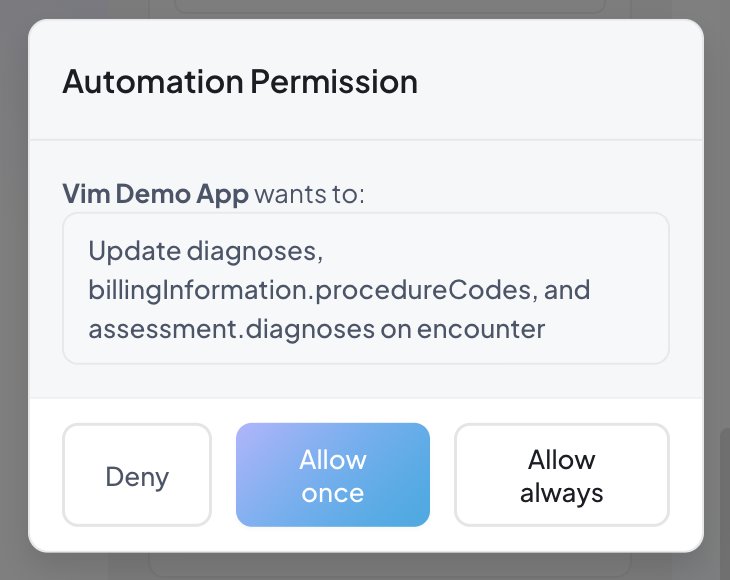
This one is asking for the entity's whole updatable set, which is why three fields are listed.
Scope the request with requestPermission('update', { fields }) and the provider reads a shorter,
more specific sentence — that is the difference between a prompt they skim and one they can judge.
They have three answers, shown left to right:
| Button | What it grants |
|---|---|
| Deny | Nothing, for the rest of this session |
| Allow once | This write only. The grant is held in memory and consumed by the next update() |
| Allow always | A standing approval for this app, entity and field set. Later requests resolve without a prompt |
`ttl` does not bound the provider's consent
requestPermission() accepts a ttl of 'session', 'day' or 'forever', and it is easy to
read that as how long the provider is agreeing for. It is not. The prompt shows no duration
control, and Allow always stores an approval for this app, entity and field set that has no
expiry — it rides the provider's Chrome profile until it is revoked. ttl sizes each individual
grant object, not the standing approval.
So do not tell a provider, or a compliance reviewer, that consent lapses after a day because you
passed 'day'. One Allow always click is indefinite.
A Worker App cannot raise this prompt
The prompt is rendered by the Hub's app frame, which exists only for a UI app. A Worker App asks
through a push notification with Approve and Deny buttons instead — see
suggestWriteback.
Knowing why a write was refused
| What you get | What it means | What to do |
|---|---|---|
PERMISSION_REQUIRED | Disruptive, and no grant covers this write | Call requestPermission() |
PERMISSION_DENIED | The field is outside the scope your manifest was granted | Widen the manifest — no prompt can satisfy this |
INVALID_DATA | The value does not match the field's schema (e.g. a string for a list of diagnoses) | Send the shape in the error's example |
requestPermission() resolves 'denied' | The request was refused, or was overtaken by a context change | Do not re-prompt for the same thing in this session |
'granted' and 'denied' are the whole public contract — the SDK does not tell you why a
request was denied, so there is nothing to branch on beyond the two. After a denial,
getCapability('update').permissionState reads 'denied' too.
A denial is per session and per app: it does not persist, and it does not affect a different entity or a different field set.
Permission States
| State | Meaning |
|---|---|
granted | Can call update() now |
requestable | Disruptive — call requestPermission() first |
denied | User previously denied this session |
Bulk Permission Request
const results = await sdk.ehr.context.requestPermission({
  encounter: { fields: ['cc'] },
  referral: { fields: ['basicInformation.notes'] },
});
// results: { encounter: 'granted', referral: 'denied' }
Update Options
const result = await sdk.ehr.context.encounter.update(
  { subjective: { chiefComplaintNotes: 'Headache' } },
  { mode: 'override' }  // 'override' | 'merge' | 'append'
);
The Update Result
update() resolves with an UpdateResult:
const result = await sdk.ehr.context.encounter.update({ subjective: { chiefComplaintNotes: 'Headache' } });

if (result.success) {
  console.log('Wrote:', result.updatedFields);
} else if (result.error === 'UPDATE_OUTCOME_UNKNOWN') {
  // Sent, no answer came back — the EHR may hold the write.
  // Check the record before retrying; a retry may duplicate it.
} else {
  console.error(result.error, result.details);
}| Field | Meaning |
|---|---|
success | false for any non-success, including an unknown outcome |
updatedFields | Field paths the EHR confirmed |
skippedValues | Items the EHR already held, so they were not written again, keyed by field. Present only when something was skipped — it is what tells a fully deduplicated batch apart from a write that resolved no fields |
error | The value to branch on. Canonical codes are typed as UpdateResultErrorCode; other values are free-form prose |
details | Human-readable diagnostic for a log line or a bug report. Never a control-flow input |
UPDATE_OUTCOME_UNKNOWN
This does not mean the update failed. The request was sent and no result came back, so
the EHR may already hold the write. It arrives with success: false; handle it apart from
failures, and check the record rather than retrying silently.
Only the desktop transport emits it. The Chrome-extension transport reports a lost reply as an ordinary failure.
Error Codes
Every code a write can throw — with what to do about each — is on Error Handling. The refusals specific to permission are covered in Knowing why a write was refused above.